Article contents 10 sections
To prepare an OEM smart lock project, settle six things before you ask for a quote: the base model and configuration, the door data, the functions and app scope, where your brand appears, the destination market, and the rough quantity and schedule. Then write down what the next sample has to prove and who on your side approves each decision.
With those in hand, the quote and the sample answer the question you meant to ask. This checklist is for importers, distributors, door factories and procurement teams, and it follows the order in which we work through an OEM brief on our OEM/ODM services.
Start With a Project Preparation Matrix
Keep one working table of what is known, what is still open, and who closes each item.
| Workstream | What to prepare | Typical owner |
|---|---|---|
| Base product | Lock family, target configuration, use | Your product team + the lock maker |
| Door and application | Door type, thickness, opening direction, cutout, frame and strike | Engineering / project team |
| Hardware scope | Mortise or lock body, panel, handle, access methods, finish | Product / engineering |
| Software / app | Platform, functions, gateway, account model, region | Product / software owner |
| Branding | Logo placement, product marking, hardware or software branding | Brand / product owner |
| Packaging | Box, labels, manual language, carton information | Brand / operations |
| Market / compliance | Destination market, regulatory and life-safety conditions | Compliance / project reviewer |
| Commercial | Quantity, MOQ, tooling, charges, timeline | Procurement / commercial |
| Sample objective | What the next sample must prove | Product / engineering |
| Approval | Who can close each gate and each open item | Project owner |
Two things usually go wrong. In the first, a door photo, a finish and a logo file arrive with a request for a quote. We can price a reference product from that. But the lock body, the usable cutout, the app and gateway functions, the label language and the market paperwork are all still open, so the price is only a starting point and the production scope is settled later.
In the second, the hardware is chosen quickly and “app support” stands in for the whole software requirement. Months later the team finds it expected a branded app, its own cloud accounts, remote access or a gateway that was never in the quoted configuration. It looks like a software problem, but the real gap is that the software scope was never written down.
An item stays open until a drawing, a sample or a written answer closes it. “Should be fine” does not close it.
1. Define the Base Configuration Before You Discuss Customization
The first technical question is “What exactly are we customizing?” Both sides need to be talking about the same physical product, and a model name covers several: our A2 IP66 waterproof smart lock, for example, comes in Local, Tuya and TTLock versions and takes 6068, 4585, Russian 6585 or Russian 6085 mortises, so “A2” alone covers twelve configurations before finish and branding are even discussed.
Write down the lock family or product type, the door and application, the lock body or mortise, the opening direction, the access methods, the power arrangement, the target market, and any app platform already part of the project.
If you are still choosing between lock bodies, app routes or door preparations, say so: the project is then at configuration selection, and customization comes after.
Know when a “base model” is still only a candidate
A candidate becomes the base configuration once the reasons it suits your doors are written down. Two locks that look the same in a catalog can differ in lock body, panel size, spindle position, cable route, app platform or access methods, and when those differences affect installation, they are different products.
Each document answers its own question: the drawing gives the lock's dimensions, the photo shows how it looks, the door schedule describes your doors. Comparing the measured door with the current drawing is the core of the fit review; hidden preparation, the strike or keeper and installation questions are resolved alongside it. Link four things:
product identity → door/application identity → configuration record → approval owner
If one is missing, we can still give a preliminary quote, but the product is not yet defined.
Door data is part of the product brief
Door fit takes more than the door thickness. For a typical entrance door we work from the door material and construction, thickness, opening direction, edge and face photos with a scale in view, the existing cutout dimensions, the mortise or lock body, backset or centre references, the frame and strike, any hardware that stays, and the constraints around cables, trim, clearances or glazing. A narrow aluminium profile door adds the stile width and section, which decides whether a narrow-panel lock such as the A11 profile door smart lock (290 × 40 mm panels, profile mortises from 2585 to 7085) fits at all.
The pre-purchase door compatibility measurement guide covers the measurement route. At this stage the rule is simple: a photo and a thickness are a starting point, and the fit is settled against the drawing.
To avoid rework, sort what has to be known before quotation, what can be closed before the engineering sample, and what can wait until production release.
| Timing | Examples of information to close |
|---|---|
| Before quotation | Target application, candidate product family, key functions, approximate quantity, branding direction, destination market, major door constraints |
| Before engineering sample | Measured door data, opening direction, lock-body route, accessories, sample objective, app and platform assumptions, known packaging constraints |
| Before production release | Final drawing and configuration, approved sample reference, finish, software or app version, labels, artwork, packaging, acceptance criteria |
Projects vary, but the principle holds: close whatever changes the next decision before that decision is made.
Keep open items open
Nobody knows everything on day one. Use four states: Confirmed (backed by a drawing, sample, document or written answer), Open, Needs checking (the direction is known, the drawing or sample is still to come), and Not applicable.
Marking an item confirmed too early hides a change. If the sheet says “door fit confirmed” when only the thickness was checked, a later cutout or strike problem looks like a change on our side when the check was simply incomplete.
2. Split the OEM Project Into Separate Workstreams
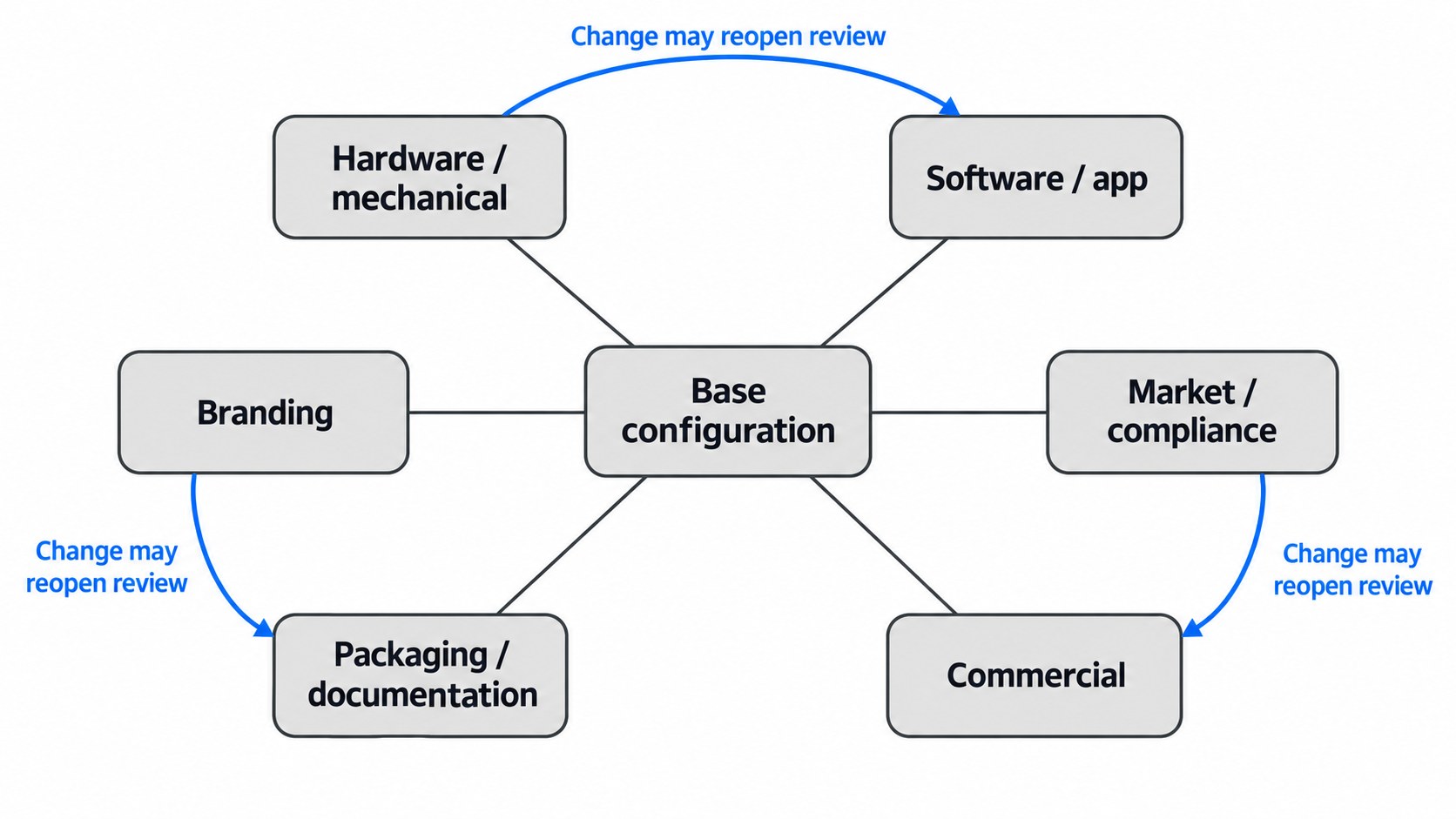
Once the base configuration is settled, split the project into workstreams, so that a request that looks cosmetic cannot quietly change engineering, software, compliance or commercial scope.
Hardware and mechanical scope
Record each requested change to the panel, handle, finish, mortise or lock body, strike, mounting, access method or any other hardware that affects fit or function.
A finish change is mostly cosmetic. A new handle shape can be cosmetic on one platform and need new tooling on another. A different lock body is an engineering change: it alters the cutout, strike, spindle position, case depth or installation. The question for every visible change is whether it alters only the appearance or the physical object that has to fit and work; if the object changes, the request goes into engineering control. Our lock bodies and accessories range shows how many interface choices sit behind one front panel.
Software and app scope
“App required” names a wish. The requirement is the list of functions: local or remote access, temporary credentials, event records, gateway use, user roles, account ownership, integrations and region-specific behaviour.
A platform's documentation lists what the platform can do; each lock model, firmware version, gateway and region supports only part of that list. On our locks the access methods and the TTLock or Tuya version are chosen per model, and a TTLock version needs a TTLock gateway and Wi-Fi for remote functions. Tie every feature you plan to sell to the configuration you order and check it on the sample.
Branding scope
Hardware branding and software branding are two jobs of different size. Hardware branding covers the logo, product marking, finish, labels and other visible private-label elements. Software branding involves the app, accounts, cloud service and their maintenance, which run separately from the physical lock; the differences are set out in App Branding vs Hardware Branding for Smart Lock OEM Projects.
So instead of “make it our brand”, list where the brand appears: on the lock, packaging, labels, manual, app or account screens. App branding can wait; what helps early is knowing whether the request is a label change, an app presentation change or software development.
A Canadian door brand that started a private-label project with us in November 2024 shows how much a tight branding scope saves. It kept one of our established outdoor platforms with its mechanical and electronic structure unchanged and changed only the surface texture, the branding and the packaging. We reached the new texture with existing processes and limited tooling adjustments, made three samples and went through two rounds of appearance approval; the version was frozen in January 2025 and the first 450 sets reached the customer in April, with a 600-set repeat order later that year. The details are on our development capabilities page.
Packaging and documentation scope
Packaging is often left until the product is approved, which is only half right. Define the deliverables early, so the product, labels, manuals and cartons still match at the end: the retail or project box, inner packing, carton marks, labels, manual, language version, model identification, barcode or SKU, and artwork files.
Artwork follows the final model name, access methods, app name, market labels and accessories, so a model or software change reopens artwork even when the box size stays the same.
At this stage, name the deliverables and the approval owner. Proofing, artwork revisions, print samples and the final packaging release are covered in Private-Label Smart Lock Branding and Packaging: A Release-Ready OEM Checklist.
Commercial scope
Raise the questions that change cost or feasibility early: the quantity under consideration, whether the customization creates an MOQ, whether it needs tooling, molds, fixtures, development or setup, who owns and maintains dedicated tooling, where price breaks fall, whether packaging carries its own minimums or charges, and which lead-time assumptions wait on engineering or artwork.
Each quotation states the MOQ, tooling, packaging, branding and development terms for that project. How tooling and NRE are priced is covered in Smart Lock Tooling Costs, NRE and MOQ for Custom Projects.
Watch the interaction between workstreams
The workstreams are linked. A hardware change can create tooling cost. A market change brings new label or document requirements. App branding shifts software ownership and maintenance. A packaging revision waits on the final model code and accessories. A new door condition can send the team back to a different lock body.
Before approving a change in one workstream, check which others it touches. That habit keeps a small request from setting off a chain of revisions.
3. Send One Brief With One Revision Number
Put the project in one document with a revision number instead of scattering it across chat messages: the project name, target product, market, door data, access methods, hardware changes, app requirements, branding, packaging and manual, quantity, sample objective, special conditions, timing and the person who approves changes. Attach drawings, the door schedule or measurements, marked-up photos, artwork, label text and the software requirement list. The project specification and RFQ guide has a fuller field list for multi-door projects.
Some fields can still be open when you ask for a quote, as long as the quote shows which assumptions it rests on. If you know the lock family, access methods, rough quantity, market and branding scope but not the artwork, that is fine; the artwork is marked provisional. The trouble comes from hidden assumptions:
- one mortise priced while you expect another;
- standard packaging priced while custom packaging is expected;
- hardware branding quoted while you expect app branding;
- one market version quoted while the destination is still open;
- sample prices issued before the accessories are defined.
When the brief changes after a quote, issue a new revision and note what changed. A new lock body, app requirement, package, market or branding request moves price, lead time and the sample in different ways, and we tell you whether the quote stands or is reissued.
4. Decide What the Next Sample Is Supposed to Prove
Every sample answers a question, so write the question down before ordering. A reference sample tells you whether the direction is worth developing. An engineering sample checks fit, configuration and functions. The approved (golden) sample fixes the look and configuration that production must match. A pilot or production sample checks that the agreed configuration is being repeated.
A sample that looks right has settled only the look. Door fit, app functions, packaging, compliance and production consistency each get their own check.
A sample should close specific unknowns
Write the sample brief as a short decision statement:
Engineering sample objective: show that the lock body fits the measured reference door, that the required access methods work on this configuration, and which installation issues remain before branding is frozen.
That gives both sides the same review target; “send one sample for approval” does not. Another:
Approved-reference sample objective: fix the visible finish, logo placement, label presentation and named configuration that later production should match.
For the next sample, write down the exact configuration and accessories, the door or use scenario, the functions to check, what the reviewer records, what counts as an open issue, and who decides whether the project moves on. Sample types, quantities and review records are covered in How to Plan a Smart Lock Sample Order: Buyer Checklist for OEM and Project Evaluation.
5. Assign Owners to Decisions, Not Just Tasks
Most OEM delays come from unclear ownership. When procurement, engineering, brand, software, operations, quality and compliance are all involved and nobody owns a decision, we receive conflicting instructions. Map each stage to an owner:
| Project stage | Main question | Decision owner to name |
|---|---|---|
| Inquiry / RFQ | Are the project inputs complete enough to quote? | Project owner / procurement |
| Configuration review | Is the base product and door/application route correct? | Product / engineering |
| Sample review | What did this sample prove, and what remains open? | Product / engineering |
| Branding / packaging review | Are the visible brand deliverables approved? | Brand / product owner |
| Software review | Do the platform functions work on this configuration? | Product / software owner |
| Market / special requirement review | Are project-specific regulatory or life-safety conditions closed? | Compliance / responsible reviewer |
| Production release | Is the approved baseline complete enough to manufacture? | Named release owner |
| Repeat order | Is the reorder still the same approved configuration? | Procurement + product / quality owner |
One person can own several gates, as long as the record says which.
Use an open-items list
Give each open issue a status, an owner, what closes it and the next milestone. A short table is usually enough:
| Open item | Why it matters | Who closes it | Blocking the next gate? |
|---|---|---|---|
| Existing cutout not measured | Fit stays open | Your engineering team | Yes, before engineering approval |
| App account ownership unclear | Software scope can change | Product / software owner | Yes, before software approval |
| Carton artwork incomplete | Final packaging waits | Brand / operations | No for engineering sample; yes before production |
| Market label requirement unresolved | Label set can change | Compliance / project reviewer | Yes, before production release |
Open is not the same as blocked
An open item stops the project only if it blocks the next gate. Artwork can stay open while the engineering sample is built, and has to be closed when production is released. A market label does not matter for a mechanical sample, but it decides the final packaging approval. That is why each item carries its timing and its owner together.
6. Treat Compliance, Cybersecurity, Fire, Accessibility, and Environmental Claims as Project Conditions
List the requirements that apply to the market and the door, and name a qualified reviewer for each.
Radio and market authorization
If the lock has radio functions, the market and the exact device or module are reviewed together. For the U.S., look up the equipment authorization for that device or module and the conditions it was granted under; the FCC ID search is the starting point.[1] The authorization has to match the configuration you ship, and an earlier project's grant covers only that project's device. Our CE (RED), RoHS and FCC test reports each cover the models named in them, so tell us the destination early and we name the reports that apply to your model and version.
Cybersecurity and software governance
Write the cybersecurity requirements for your market and project as testable requirements. Market rules such as the EU Radio Equipment Directive cybersecurity requirements and the UK PSTI regime are summarized in the certificate and import compliance guide; device and software questions are covered in the cybersecurity, privacy and software lifecycle guide.
NISTIR 8259A describes six device capability areas: device identification, device configuration, data protection, logical access to interfaces, software update, and cybersecurity state awareness.[2] State which of them matter for your project and who checks them on the chosen configuration.
Fire, egress, and accessibility-sensitive openings
Mark fire-rated doors, escape routes and accessibility-sensitive doors before the product is finalized.
U.S. references include NFPA 80, Standard for Fire Doors and Other Opening Protectives, and NFPA 101, Life Safety Code.[3][4] Accessibility requirements in the U.S. are addressed through the ADA Standards and U.S. Access Board guidance.[5][6]
These references set the review areas. The responsible project authority, reviewer, certifier, or AHJ decides what is acceptable for the actual installation, so name that reviewer before the product is finalized.
Environmental performance
Record outdoor, wet, coastal or corrosive conditions as requirements. A finish name, an IP rating or salt-spray hours describe a test result on the tested construction; salt-spray hours do not convert directly into years at a real site, and service life comes down to the configuration and where it is installed. IP ratings on our locks are model-specific and listed on each model page.
7. Freeze the Approved Baseline Before Production
Production is built to a named, approved configuration, never to memory, chat history or an unmarked sample. Before release there is one approved baseline listing the current drawings, product configuration, BOM or component scope, approved reference sample, finish, software or app version, labels, packaging artwork, and inspection or acceptance criteria.
Anything still open is listed as open, even when the purchase order is ready.
“Same as the approved sample” is not enough by itself
The sample gives everyone a shared reference once it is tied to the drawing revision, configuration, finish, software version, label set and packaging it represents. Left untied, the next order drifts while everyone believes it is the same. A simple record answers:
- which sample was approved;
- which configuration it represented;
- which records define that configuration;
- which items were still open at approval;
- and what later changes require renewed review.
Name the baseline and release owner so later sample comparisons, deviations, first-batch checks and repeat orders all refer to the same approved configuration.
Changes after approval need a new decision
Changes that matter include different door data, a different lock body or mortise, a hardware revision, a firmware or app version change, different branding or label content, a packaging revision, a destination-market change, or a changed inspection requirement.
One rule covers them:
If the product changes, decide whether the approval has to be reopened, before the change is accepted.
At our factory a change is confirmed in writing and issued as a controlled drawing and bill of materials that production, quality and packing all work from. In a 2024 order for 1,500 gate locks from a European door manufacturer, 600 had a spindle 5 mm longer than the other 900; we issued two marked sub-versions, kept them apart through assembly and packing, and checked every unit against its version (quality and testing). Baselines and change records are covered in From Golden Sample to Mass Production: Smart Lock Baseline and Change Control.
8. Use This Final Pre-Quote / Pre-Sample Checklist
Before asking us, or any lock maker, to quote or build the next sample, run through these questions. Open answers are fine; mark them open.
Product and door
- What base model or product family is being discussed?
- What door/application is it for?
- Are the critical door measurements and installation conditions available?
- Is the mortise or lock-body route known?
- Is the opening direction known?
- Which fit assumptions are still open?
Function
- Which access methods are required?
- Is a gateway required?
- Which app/platform functions matter?
- Which firmware, account, region or integration assumptions are still unresolved?
Branding and packaging
- Where should the logo or product marking appear?
- Is software branding also required?
- What packaging, labels, manuals, and languages are expected?
- Who owns artwork approval?
Commercial
- What quantity is being discussed?
- Are MOQ or tooling questions still open?
- Could the project carry development or setup charges?
- Which timing assumptions wait on engineering or artwork?
Sample
- What is the next sample supposed to prove?
- Which configuration and accessories must be included?
- Who will review it?
- What will the reviewer record?
- What happens if the sample closes only some of the open issues?
Market and project conditions
- What is the destination market?
- Are radio, cybersecurity, fire, egress, accessibility, environmental, or project-specific requirements involved?
- Who owns those reviews?
Approval
- Who can approve the configuration?
- Who can approve branding and packaging?
- Who can approve software/app scope?
- Who can release production?
- Which open issues still block the next gate?
With those answered, the quote and the sample are built on a defined project.
References
- Federal Communications Commission. FCC ID Search.
- National Institute of Standards and Technology. NISTIR 8259A: IoT Device Cybersecurity Capability Core Baseline.
- National Fire Protection Association. NFPA 80: Standard for Fire Doors and Other Opening Protectives.
- National Fire Protection Association. NFPA 101: Life Safety Code.
- ADA.gov. 2010 ADA Standards for Accessible Design.
- U.S. Access Board. Chapter 4: Entrances, Doors, and Gates.