Article contents 13 sections
Private labeling puts your brand on the lock, the packaging and the user materials, whether you start with a logo on an existing model or a fully branded package. The release is ready when every file describes the same approved product: one identity record per sellable configuration, current artwork, a model/SKU/barcode map, a tested QR destination, a contents list that matches the box, and manuals matched to model and language. We help keep these details aligned so the finished box matches the approved product.
The lock, box, labels, manual, QR code, model name, SKU, barcode, app reference and accessories each describe the product to someone different. A box with the right brand and the wrong model number, a manual that shows the right lock and links an old app, or a barcode for one item on a carton holding another look polished but are still wrong.
This checklist covers the physical brand and packaging layer: identity, artwork, labels, manuals, identifiers, proofs, packaging samples, revisions and the release package. App-branding strategy is a separate decision, covered in app branding vs hardware branding, and the steps before packaging (base model, door data, sample objectives) are in the OEM smart lock project preparation checklist. Agree the packaging scope, who supplies each identifier, fees, minimums and the approval schedule before production is authorized.
1. Freeze the Product Identity Before You Build Packaging Around It
Before designing anything, name the configuration and included items clearly enough that every file points to the same thing. A typical identity covers:
- product family;
- your model name;
- the factory model code;
- hardware variant;
- finish;
- mortise or lock-body configuration, when it changes the sellable item;
- access-method combination;
- app or platform;
- gateway, if the configuration needs one;
- destination market;
- language version;
- included accessory set.
Only some of these go on the box, and all of them are recorded somewhere in the package, so the team knows which artwork belongs to which configuration.
One model name, several sellable items
One family name across several configurations can work commercially, but the packaging still has to tell apart the versions that matter. Two locks with the same exterior can have different lock bodies, app routes, finishes or accessory sets. Our G1 apartment smart lock is an example: the G1-1 (TTLock) and G1-2 (Tuya Wi-Fi) share the 353 × 73 mm iron housing in Athens black, so the warehouse, installer and end customer tell them apart from the label and the manual, and distributors keep them as separate stock items. The rule:
one sellable configuration → one controlled identity record
That record then drives the box, label, manual, barcode, QR destination and carton information.
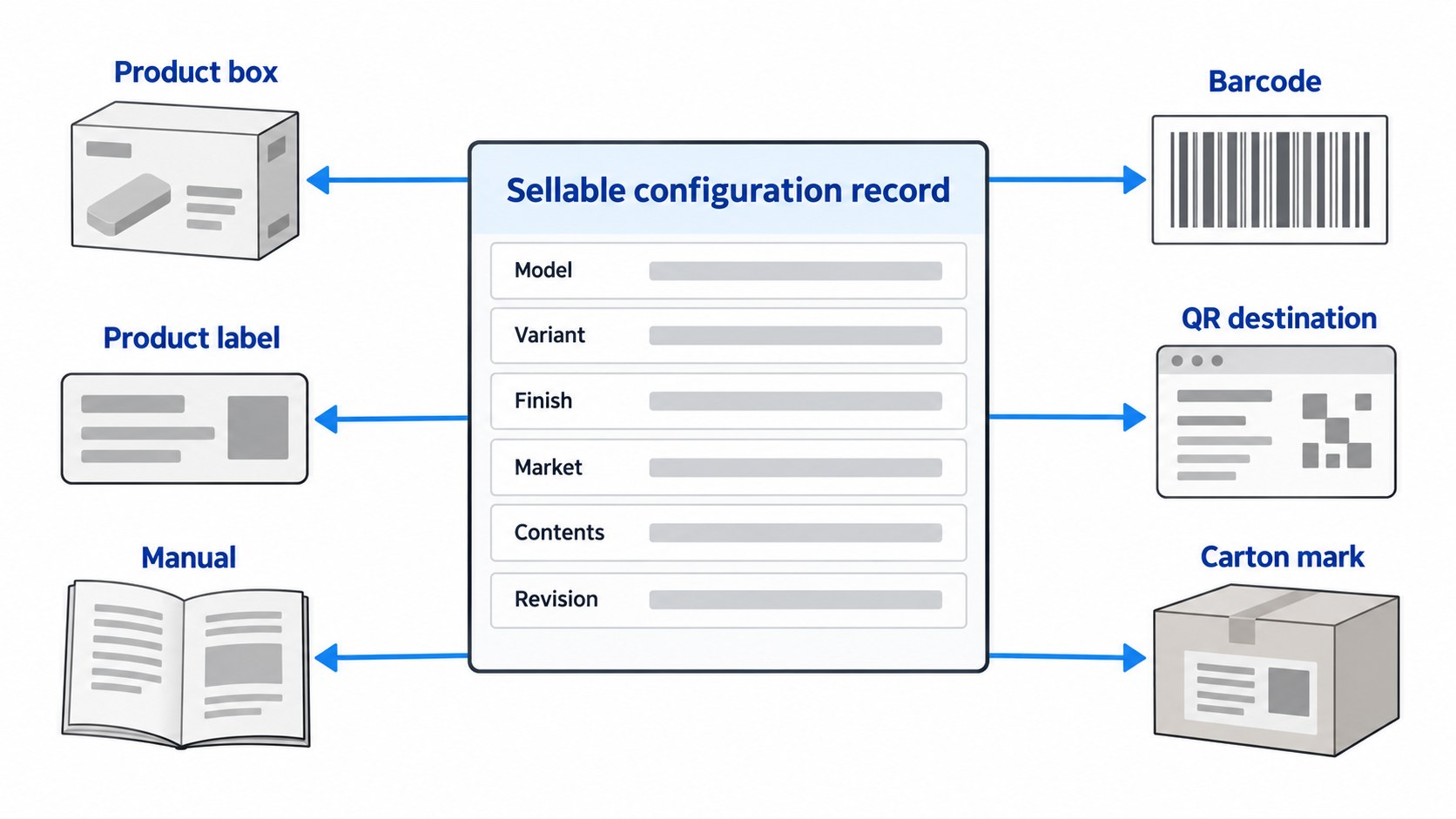
Create a One-Page Identity Record Before Artwork Starts
A short identity record prevents a costly error: several correct-looking files describing different products. Keep one row per sellable configuration, each with a stable project ID.
| Identity field | Record for each configuration | Check before release |
|---|---|---|
| Model / SKU | The name used on the order and in inventory | Matches the approved quote and purchase order |
| Hardware variant | Panel, mortise/lock body, finish and access-method combination | Matches the retained hardware reference |
| Market and language | Destination market and document set | Matches the label and manual language |
| Included items | Standard accessories and any optional items | Box contents list matches the pack |
| Digital route | App/platform name and QR destination where used | Link tested from the printed code |
| Release pointer | Artwork, label, manual and carton revisions | All files point to one release record |
It is deliberately small: the artwork team, the factory and the warehouse start from the same page without a manufacturing BOM.
2. Build One Asset Matrix Before Sending Files to the Factory
Brand files get out of control when they arrive through scattered emails, chat attachments and PDFs named final, final2 and final-new. Start one asset matrix before production artwork begins.
| Asset | Applies to | Owner | Current revision | Approval status | Notes |
|---|---|---|---|---|---|
| Hardware logo file | Lock panel/model | Brand owner | Rev. | Open / Approved | Position controlled separately |
| Product-box artwork | Model/SKU/language | Brand/packaging | Rev. | Open / Approved | Dieline-specific |
| Product label | Model/SKU/market | Product/operations | Rev. | Open / Approved | Identifier source recorded |
| Manual / quick-start guide | Model/language/app route | Product/support | Rev. | Open / Approved | QR/app references checked |
| Barcode artwork/data | Sellable trade item | Brand/operations | Rev. | Open / Approved | Issuer/source recorded |
| QR code | One destination | Product/digital owner | Rev. | Open / Approved | Destination tested |
| Inner/master carton mark | Logistics unit | Operations | Rev. | Open / Approved | Quantity and handling data checked |
It has to answer three questions:
- Which file belongs to which product?
- Which revision is current?
- Who has authority to approve it?
Keep the brand master separate from production artwork
Keep a brand master with the approved logo, colors, names and usage rules, and derive the production files from it:
- lock marking;
- box artwork;
- label artwork;
- manual cover;
- support card;
- carton mark;
- digital artwork used in packaging.
A logo update then means regenerating files from one source, with no guessing which old packaging file held the right version.
3. Map Every Branding Surface, and Keep App Strategy Separate
“Branding” covers several different things. At the packaging stage, map the physical surfaces that carry the approved identity:
- lock panel;
- product box;
- product label;
- manual;
- quick-start card;
- warranty or support card;
- accessory pouch or insert;
- inner carton;
- master carton.
The app itself is a separate scope. When the manual or box names the app, shows its icon or a download page or setup route, the packaging record keeps that reference consistent across the files; whether to use a standard app, a white-label app or custom software is decided elsewhere, and before the packaging names and icons are approved. On our app versions the standard routes are the TTLock and Tuya apps, chosen per model and version; a dedicated or white-label app is a separate development request.
Confirm physical marking against the exact hardware
A hardware logo file tells the factory:
- which model and panel it belongs to;
- placement;
- size;
- orientation;
- approved artwork;
- finish and background;
- any keep-out area around buttons, sensors, displays or regulatory marks.
Check the logo position for each lock in a product family: different panel geometry can make the same mark look wrong or crowd another visible element. A logo sized for the 353 × 73 mm G1 panel, for instance, has to be resized and rechecked for the 290 × 40 mm panel of our A11 profile door smart lock. We check size, position and contrast on the real surface, which is why the logo is approved on a physical sample.
4. Treat Package Contents as Product Data, Not Decoration
The box tells the customer what is inside, so the contents list needs the same control as the product identity. A smart lock pack can hold:
- front and rear lock panels;
- mortise or lock body;
- strike or strike plate;
- spindle;
- mounting screws;
- cylinder or mechanical keys;
- cards or tags;
- cables;
- gateway;
- installation accessories;
- manual or quick-start guide.
Contents change by model and order, so print a contents list only for the sellable configuration it was checked against. In a 2024 order of 1,500 gate locks, 600 with a spindle 5 mm longer than the other 900, we issued two marked sub-versions and checked the carton marks, packing lists and accessories for each group separately (quality and testing); one box design with two contents lists would have mixed them.
Optional items must not look standard
An accessory that is available but not in the box causes confusion. If a gateway, cylinder, card pack, battery pack or other accessory is optional, the packaging has to make that plain, because sales teams, warehouses, installers, distributors and after-sales support all read the box as a promise. A TTLock lock sold for remote access needs a TTLock gateway, for example, so the box says whether the gateway is inside or ordered separately.
The printed list matches what was ordered.
5. Keep Model, SKU, Barcode, GTIN, Serial Number, and QR Code Separate
These identifiers are related but do different jobs, and a project gets easier once nobody uses “barcode”, “SKU” and “model number” interchangeably.
Model
The model identifies the product or configuration in your product system or the factory's.
SKU
A SKU is usually an internal commercial or inventory identifier created by the business. It can tell apart variants, packaging versions, markets, finishes or bundles.
GTIN
A Global Trade Item Number is a standardized trade-item identifier in the GS1 system. GS1 describes a GTIN as a unique identifier for trade items that can be priced, ordered, or invoiced in the supply chain, and states that the brand owner is normally responsible for assigning it.[1][2]
A barcode is the machine-readable symbol that can encode a GTIN; the number and the graphic are two different things.[1]
Retailers and marketplaces usually require a GTIN; project orders that never pass through retail often need none, so the customer or channel decides.
Serial number
A serial number identifies one unit. The sellable product type keeps its own trade-item identifier.
QR code
A QR code can point to:
- app download page;
- installation video;
- manual;
- support page;
- registration page;
- product information.
The destination is part of the controlled asset: the QR image can stay the same while the page behind it goes out of date, so test the live destination before release.
6. Control SKU and Barcode Mapping Before Artwork Approval
Barcode mistakes are expensive because they pass unnoticed through design: the artwork looks perfect while the code belongs to another variant. Build a mapping table before packaging approval. In this example a distributor sells two G1 versions under its own model name and adds a second model for another market:
| Your model name | Internal SKU | Base configuration | GTIN or barcode data if used | Packaging revision | Manual / language |
|---|---|---|---|---|---|
| HL-100 | HL100-TT | G1-1, TTLock | Brand-owner data | PKG-A-R3 | MAN-A-EN-R2 |
| HL-100 | HL100-TW | G1-2, Tuya Wi-Fi | Brand-owner data | PKG-B-R2 | MAN-B-EN-R1 |
| HL-200 | HL200-EU | Second model, EU version | Brand-owner data | PKG-C-R1 | MAN-C-EU-R1 |
What is controlled is the relationship between the identifiers. Here the two HL-100 versions share a name and a box size but still need two manuals, because the app setup differs.
Decide who owns the barcode before asking for one
Before asking the factory to “make a barcode”, decide:
- who owns the trade item identity;
- who issues the SKU;
- whether a GTIN is required;
- who supplies the final number;
- who generates the barcode symbol;
- who checks the printed and encoded result.
GS1 states that the brand owner is normally responsible for allocating GTINs to its trade items.[2] Retailer or marketplace identifier rules come on top of that. A barcode area on the box design is a layout choice; whether the project needs a code is settled by the channel.
7. Treat Manuals and Language Versions as Controlled Product Assets
A manual carries the product identity, diagrams, installation steps, access-method instructions, app names, QR codes, support information and model-specific behavior, so it changes when the hardware or software route changes.
Tie every manual to a product and revision
Record at least:
- model and configuration;
- language;
- document revision;
- approval date;
- app or platform reference;
- QR destination;
- accessory references;
- images and diagrams used;
- responsible approver.
The same logic applies to:
- quick-start guides;
- installation sheets;
- support cards;
- warranty cards;
- in-box notices.
Plan multilingual versions deliberately
Decide the document set per market before printing. Common structures:
- one-language package;
- bilingual manual;
- multilingual manual;
- common box plus separate market-language insert;
- market-specific label or document set.
A distributor selling into one country usually takes a one-language package; a brand shipping one SKU to several EU countries often prefers a common box with a market insert, so only the insert changes per market. The packaging record controls the version relationship between the files; legal language requirements belong to the market compliance review.
8. Check QR Codes and App References as Part of Packaging Approval
Smart lock packaging often links the product to a web page or app, a dependency ordinary packaging checks miss. Before approval, test that:
- the QR code scans;
- the destination is live;
- the destination belongs to this product;
- the right app or platform is named;
- the page suits the destination market;
- the manual and box point to the same route;
- older artwork carries no old domains or download links.
A file can look right and point to the wrong place.
Scenario: the stale QR code
You move from an old setup page to a new branded support page. The box artwork is updated, while the manual was copied from the previous revision and still carries the old QR code. Both look professional; only one is current. A revision-controlled release package shows the mismatch before printing.
9. Separate Digital Artwork Approval From Physical Packaging Approval
Use evidence checkpoints instead of a single “final” email
Log a dated checkpoint for each approval layer: data check, digital proof, printed proof when needed, and physical sample when needed, each naming the revision checked and any open items.
| Checkpoint | What to keep | Release decision |
|---|---|---|
| Data and identity | Identity record, SKU/GTIN mapping, package contents | Hold / pass |
| Digital proof | Approved PDF or artwork export with revision | Hold / pass |
| Print appearance | Printed proof, or the recorded reason it was skipped | Hold / pass |
| Physical sample | Photos, fit notes, scan/readability result | Hold / pass |
A reorder then rests on the record, and nobody has to remember which attachment was “the final one”.
A PDF proof covers:
- copy;
- model name;
- logo placement;
- colors by specification;
- barcode data;
- QR destination;
- language;
- panel order;
- basic layout.
The physical result needs a printed proof or physical sample, which is worth it when you need to review:
- printed color;
- material;
- coating and finish;
- folding;
- cut lines;
- insert fit;
- accessory fit;
- product fit;
- readability at actual size;
- label position;
- QR scanning;
- barcode readability;
- protective function;
- overall presentation.
| Review stage | Best for checking | Leaves for a later stage |
|---|---|---|
| Digital artwork proof | Text, identity, layout, file revision, data, QR destination | Physical color, material and fit |
| Printed proof | Print appearance, scale, color direction, readability | Full product and accessory fit |
| Physical packaging sample | Box construction, fit, inserts, final presentation | Consistency across the production lot |
Simple jobs, such as a logo sticker on a standard box, can skip the printed proof; a new rigid box with a molded insert needs all three.
Give the packaging sample defined questions
A physical sample earns its cost when there is something physical to check:
- Does the lock fit the insert correctly?
- Are accessories separated clearly?
- Can the box close without pressure on the hardware?
- Is the label readable at final size?
- Does the finish look acceptable on the real material?
- Can the QR code be scanned after printing?
This review covers packaging fit, protection, appearance and readability; lock performance has its own acceptance criteria. Lot checks of cartons and labels before shipment are covered in packaging and label inspection.
10. Control Revisions So Old Artwork Cannot Quietly Return
Artwork errors come more often from version confusion than from design: a revised manual approved while an older box sits in the factory folder, a new SKU table while the print file keeps the old barcode, a new app name while an old quick-start card stays in the box. Keep a simple revision register.
| Deliverable | Current approved revision | Approval date | Supersedes | Release status |
|---|---|---|---|---|
| Hardware mark file | Rev. | Date | Prior revision | Released / Hold |
| Box artwork | Rev. | Date | Prior revision | Released / Hold |
| Product label | Rev. | Date | Prior revision | Released / Hold |
| Manual | Rev. | Date | Prior revision | Released / Hold |
| QR / digital destination record | Rev. | Date | Prior revision | Released / Hold |
| Carton mark | Rev. | Date | Prior revision | Released / Hold |
A spreadsheet is enough, as long as it gives one clear answer to:
Which exact files may the factory use now?
Retire superseded files explicitly
Mark obsolete files as superseded, archive them or move them out of the production folder, so the factory receives one release set that is easier to use correctly than incorrectly.
11. Release One Final Private-Label Package
Before release, collect the approved deliverables into one package:
- final hardware marking artwork;
- product-box artwork;
- label artwork;
- model/SKU mapping;
- GTIN or barcode data, if used;
- QR destination record;
- manual and quick-start files;
- language mapping;
- approved package-contents list;
- inner and master carton marks;
- proof and sample approval record;
- revision register;
- release note identifying the current approved files.
It sits beside the manufacturing BOM and the golden sample production baseline: it is the brand and packaging information the factory is allowed to use.
Make the release package easy to audit later
Months later, the project file should still answer:
- Which box revision was used?
- Which manual went inside?
- Which label matched that SKU?
- Which QR destination was current?
- Which artwork was superseded?
- Who approved the release?
These matter most when several models or markets share similar packaging, or when a repeat order comes months later: the Canadian brand above placed its 600-set repeat order six months after the first 450 sets were delivered.
12. Final Pre-Release Checklist
Before releasing private-label artwork and packaging, go through each line:
Product identity
- The exact model/configuration is defined.
- The model name is consistent.
- Finish/variant is mapped correctly.
- Package contents match the purchased configuration.
Brand assets
- Correct logo file is used.
- Hardware-mark placement is approved.
- Brand names and product names are consistent.
Packaging and labels
- Box artwork matches the correct model.
- Product label matches model/SKU data.
- Inner/master carton information is current where used.
- Optional accessories are marked as optional.
SKU / barcode / QR
- SKU mapping is correct.
- GTIN/barcode data comes from its owner, if the channel needs one.
- Printed/encoded barcode data matches the item in the box.
- QR code destination is tested.
- Manual and packaging use the same current digital destination.
Manuals and languages
- Correct manual version is included.
- Language set matches the market or project.
- App/platform references are current.
- Images and accessory references match the product.
Approval and revision
- Digital artwork has been approved.
- Physical packaging sample has been reviewed where required.
- Current revisions are clearly identified.
- Superseded files are retired.
- Final release package contains only approved production-use files.
Anything still open is recorded with its owner, and the package becomes final once it is closed.