Article contents 13 sections
To carry an approved smart lock sample into mass production, turn the approval into a production baseline: the approved sample plus the records that define it (model, drawing revision, mechanical configuration, key components, firmware, accessories, packaging and documents, accepted deviations). After that, any change that affects the product, packaging or order is agreed in writing before it goes into production, with the order or batch it applies from.
Approving a sample is a milestone. Months later the factory can be working with a new component batch, a revised drawing, a new firmware build, an alternate part source, an updated manual or a changed packaging file. If the record only says “sample approved”, both sides can believe they follow the approval while meaning different configurations. A baseline answers three questions at any time:
- What exactly are we supposed to build?
- What has changed since approval?
- Which version applies to this production order?
Here, golden sample means the approved physical reference agreed for the project. Companies use the term differently, and the sample is one part of the baseline. Choosing and reviewing the samples that lead up to it is covered in the OEM smart lock project preparation checklist.
1. A Golden Sample Is a Reference, Not the Entire Production Specification
A physical sample preserves what text describes badly: surface appearance, color, fit, feel, how parts sit together, label position and the overall approved result. What it leaves out is everything a future production team reads from records:
- which drawing revision was approved;
- which internal component source was used;
- which mortise or lock-body configuration was included;
- which firmware build was installed;
- which app or platform the lock ran on;
- which accessory set belonged to the order;
- which packaging and manual revision was current;
- which deviations were intentionally accepted;
- whether a later substitution was approved.
So “make production the same as the golden sample” works only once the sample is tied to a named configuration and its records. Agree the controlled fields, who approves changes and how changes are notified for the order. Inspection methods and sampling plans are separate quality activities.
Define what the sample actually approves
When a sample still has open items, approval comes in parts. A sample can be:
- approved for appearance, with firmware still open;
- approved for mechanical fit, with packaging still open;
- approved with one temporary component;
- approved for one mortise, with the other option still to be sampled;
- approved with a listed deviation that applies to this order only.
The approval record states what the sample represents and what it leaves open, because sample approval and production release are two separate decisions. Sample types and what each one is for are covered in how to plan a smart lock sample order.
2. Build a Production Baseline Around the Approved Configuration
A production baseline is the agreed description of the product version that the order follows.
NASA's configuration-management guidance describes a baseline as an agreed and documented description of product attributes at a point in time, providing a known configuration against which later changes are addressed.[1] A smart lock project needs the principle without the aerospace machinery: give the approved version a clear identity and make later changes visible. A baseline links these items:
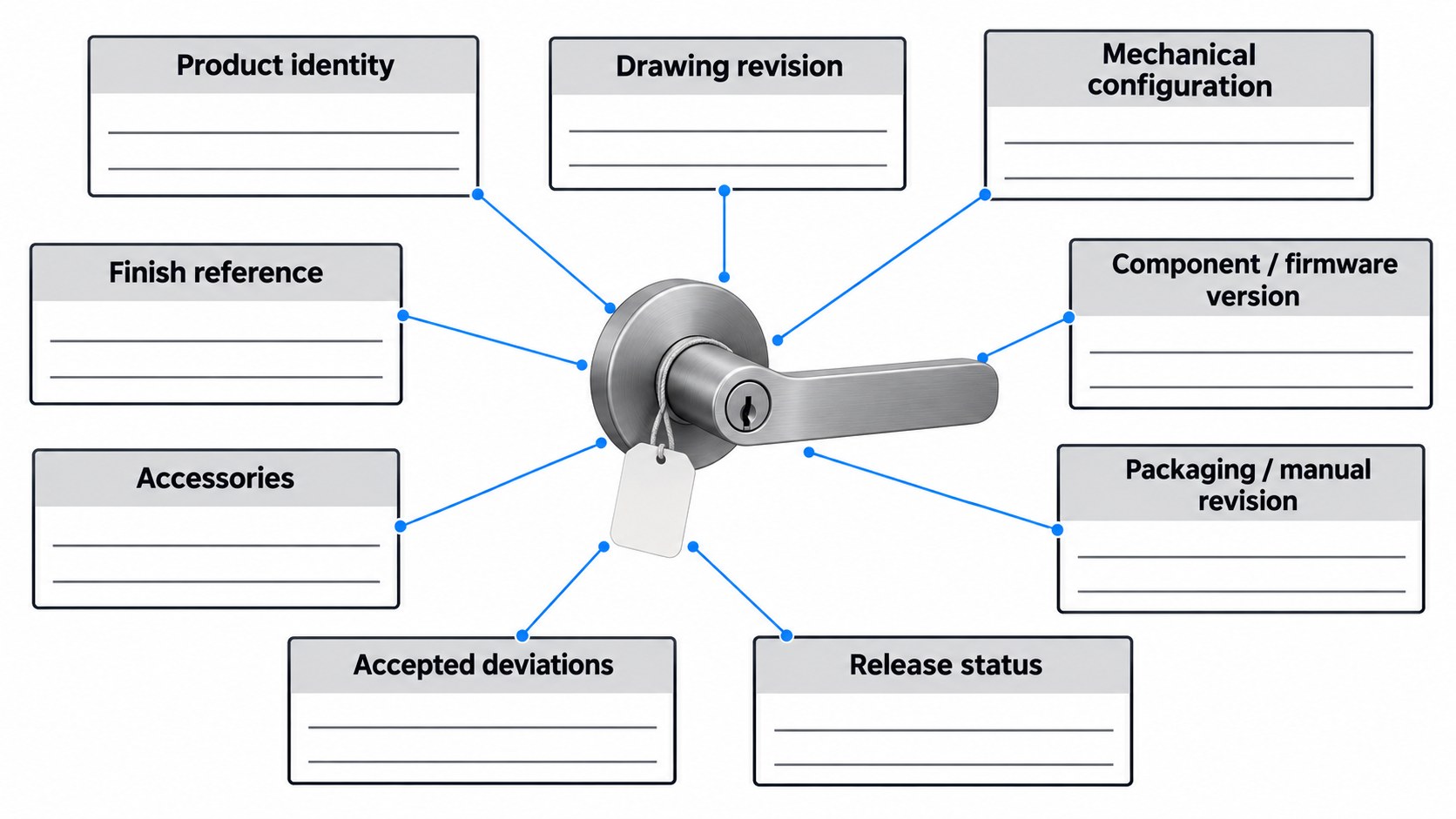
| Baseline field | What to record | Why it matters |
|---|---|---|
| Product identity | Your model/SKU and the factory model code | Keeps approval tied to one variant |
| Physical reference | Approved sample ID, date, photos or retained sample reference | Identifies the physical comparison point |
| Mechanical configuration | Panel, handle, mortise/lock body, door-fit assumptions | Keeps configurations apart |
| Finish / appearance | Finish name/code and approved appearance reference | Controls visible variation |
| Drawing / specification | Current revision or dated specification | Identifies the released technical description |
| Component configuration | Critical approved components or controlled BOM/version reference | Makes substitution visible |
| Electronics / firmware | Board or firmware version | Makes digital variation visible |
| Software dependency | App, platform and gateway | Approves the hardware together with the system it runs on |
| Accessories | Cards, keys, gateway, cables, fasteners and other included items | Keeps the shipment scope fixed |
| Packaging / documents | Box, label, manual and insert revisions | Keeps buyer-facing materials aligned |
| Accepted deviations | Explicit approved exceptions | Keeps exceptions from becoming accidental standards |
| Release status | Approved / open / conditionally approved | Shows whether production is released |
It is a control record for your order; the factory's confidential manufacturing detail stays with the factory.
Control what matters commercially
You rarely need the factory's complete internal BOM. What you need is visibility of changes to the important items. For a smart lock, those typically include:
- mortise or lock-body type;
- front and rear panel construction;
- reader or biometric module;
- motor or actuator-related components;
- PCB or electronics revision;
- battery configuration;
- sealing-related parts for outdoor models;
- firmware;
- gateway or platform;
- accessories;
- finish;
- buyer-facing labels and documents.
On a lock like our A2 IP66 waterproof smart lock, the mortise (6068, 4585, Russian 6585 or Russian 6085, all among our security door mortises), the Local, Tuya or TTLock version and the seals that carry the IP66 rating all belong on that list. An indoor lock with one version needs a shorter one.
3. “Freeze the BOM” Should Mean Freeze the Approved Configuration
“Freeze the BOM” is a common request before production. What it should mean is that both sides can name the approved configuration and know which changes need review. A configuration is ready for release when:
- the model and variant are clear;
- the critical hardware configuration is identified;
- drawings and specifications are on the current revision;
- electronic and firmware dependencies are identified;
- accessories and packaging versions are aligned;
- known deviations are recorded;
- unresolved items are closed or explicitly excluded from production release.
That avoids a common problem: several sample rounds approved in chat, and nobody writes down the final combined version.
Several sample rounds, one release
Take a project where:
- Sample 1 had the preferred finish;
- Sample 2 corrected the mortise configuration;
- Sample 3 fixed firmware behavior;
- the final manual was approved separately.
“Follow the approved samples” leaves production to guess the combination. The baseline consolidates the current approved state into one release reference. The Canadian door brand on our development capabilities page went through three samples and two rounds of appearance approval before its version was frozen in January 2025, three months ahead of the first 450-set delivery.
Use a change request that can travel with the order
A change request should be readable by purchasing, engineering, quality and the factory. Keep these fields even for a change that looks minor:
| Change-request field | What the record should answer |
|---|---|
| Change ID and date | Which request is this, and when was it raised? |
| Old baseline | Which sample, drawing, component or firmware was approved? |
| Proposed condition | What exactly will be different? |
| Reason and scope | Why is the change needed, and which models/orders are affected? |
| Impact review | Fit, function, appearance, software, packaging, cost or timing effects |
| Evidence | Comparison data, test, sample, drawing or document review |
| Decision | Approved, rejected, temporary deviation or more evidence required |
| Effective point | From which order, batch or serial range does it apply? |
| Owner and closeout | Who updates the baseline and closes the request? |
The effective point is what ties an approved change to the shipment that contains it.
4. Control Changes by Their Impact, Not by How Small They Sound
Changes after approval are normal: a component becomes unavailable, you ask for another finish, a PCB is revised, a firmware issue is fixed, the printer changes a material, a sub-supplier offers an equivalent part. The risk is a change entering production without a decision. A change review answers:
- What is changing?
- Why?
- Which product/version is affected?
- Which orders or production batches are affected?
- What was the old condition?
- What is the proposed new condition?
- Does fit change?
- Does function change?
- Does appearance change?
- Does software or compatibility change?
- Does testing need to be repeated?
- Does packaging or documentation need to change?
- Does the change affect tooling, cost, MOQ, or lead time?
- Is a new sample or reapproval needed?
- From which order/batch does the change become effective?
A short impact matrix speeds that up.
| Change type | Typical impact questions | Possible follow-up |
|---|---|---|
| Finish / appearance | Color, texture, coating behavior, appearance match? | Appearance sample or approval |
| Mechanical | Fit, dimensions, mortise compatibility, assembly, durability? | Drawing review, sample, revalidation |
| Component / material | Function, life, sourcing, compatibility, appearance? | Comparison evidence, sample or test |
| Electronics / PCB | Electrical behavior, power, compatibility, firmware dependency? | Engineering review and functional validation |
| Firmware | Features, access logic, app behavior, power use, error handling? | Versioned functional review |
| Packaging / documents | Model mapping, labels, manual instructions, included items? | New file revision / proof |
| Part source / sub-supplier | Is the output equivalent in the critical characteristics? | Change review before the part is used |
Some changes need a new sample, others a document review, and the impact decides which. A spindle 5 mm longer sounds trivial; in a 2024 order of 1,500 gate locks, 600 needed exactly that, and we ran them as a separate controlled sub-version through material issue, assembly and packing, with every unit checked against its version.
5. Make Substitutions a Visible Decision
Products drift most easily through substitutions that sound reasonable:
- the original component is temporarily unavailable;
- the alternate part has the same specification;
- the sub-supplier has changed;
- the new component is “equivalent”;
- the replacement is internal and nobody will notice.
Some substitutions are harmless. Others affect function, fit, durability, firmware behavior, radio performance, power use, appearance, sealing, certification documents or later service parts. The aim is an agreed list of which substitutions need approval, with everything else allowed. A change notice identifies:
- the affected part or process;
- reason for the proposed change;
- old and new source/part/version;
- claimed equivalence;
- known differences;
- affected product models;
- effective order/batch;
- validation completed;
- samples or test results available;
- your decision.
In our factory, electronic modules, motors, fingerprint sensors, die-cast parts and some lock bodies come from qualified suppliers, and incoming parts are checked for version and dimensions so the module in your lock matches the one in your approved sample. Those bought-in parts are where substitutions usually start, so they are the first lines on the list.
“Equivalent” is a conclusion, checked against the project's acceptance criteria.
6. Separate a Permanent Revision From a Temporary Deviation
A temporary exception and a new standard version are recorded differently.
| Situation | Meaning | What should happen next |
|---|---|---|
| Permanent revision | The approved baseline is intentionally changed going forward | New revision/version becomes the current reference |
| Temporary deviation | A specific exception is accepted for a limited scope | Record the affected order/batch/quantity and expiry or closure condition |
| Unapproved substitution | Production differs without agreed disposition | Hold it outside the approved baseline until reviewed |
Companies use different labels; the control matters more than the name. A temporary deviation stays temporary even when the next purchasing team finds it in the last shipment.
Record the scope of the exception
For an accepted deviation, record:
- what differs from the normal baseline;
- why the exception is being accepted;
- which order, batch, quantity, or period it covers;
- what supported the decision;
- whether future orders return to the original baseline;
- whether a permanent revision is being developed.
This matters most on repeat orders.
7. Control Firmware and Software-Dependent Behavior as Part of the Product Version
Two smart locks can look identical and behave differently because of:
- firmware revision;
- app version or platform behavior;
- gateway dependency;
- region setting;
- access-method logic;
- feature enablement;
- configuration parameters.
So the baseline names the digital dependencies that affect acceptance. App updates that change nothing the buyer accepted stay out of the hardware record; the project still knows which firmware and software condition the approved behavior was checked on. On our app versions that starts with the platform itself: a TTLock lock is managed in the TTLock app and needs a TTLock gateway and Wi-Fi for remote access, while a Tuya version runs in the Tuya app, and for Tuya we confirm the remote functions you need for the model and version you order.
A firmware change can be invisible until the user operates the lock
A new firmware build can fix one issue while changing:
- access timing;
- menu behavior;
- alarm logic;
- battery reporting;
- app pairing;
- credential behavior;
- gateway interaction.
When those behaviors matter, the revision appears in the change record and is rechecked. The same applies when the hardware stays the same and the platform, account structure or gateway route changes.
8. Keep Packaging, Labels, Manuals, and Accessories on the Same Release
The right lock can still ship in a carton with:
- an obsolete manual;
- the wrong accessory set;
- an old QR code;
- a label for another variant;
- a prior packaging revision.
On private-label projects, packaging and documents have their own approval workflow, set out in the private-label branding and packaging checklist; once approved, their released versions are linked to the same order and configuration. The record answers:
- Which box revision applies?
- Which label applies to this model/SKU?
- Which manual language/version applies?
- Which accessories are included?
- Which QR destination or digital document is current?
That keeps a technically correct lock from shipping as a commercially wrong product.
Compare the first batch against the same identity used for approval
Before the first batch goes into the normal order rhythm, run a short baseline check:
| Baseline element | First-batch question | Record |
|---|---|---|
| Product identity | Is the model/SKU and revision the released one? | |
| Hardware configuration | Do the panel, mortise/lock body and finish match? | |
| Digital behavior | Is the approved firmware and platform condition present? | |
| Included items | Are accessories and documents the released set? | |
| Packaging identity | Do label, manual, QR and carton revisions match? | |
| Deviations | Are all differences listed and dispositioned? |
This checks the baseline; the inspection plan runs alongside it.
9. Use the First Mass-Production Batch to Confirm the Released Baseline
The first production run is the first time the approved configuration is built at scale, which makes it the natural checkpoint. Factory QC, AQL sampling and pre-shipment inspection stay as they are; the production-control question is narrower:
Did the factory build the released version?
A first-production baseline check covers items such as:
- model/SKU and revision;
- approved mechanical configuration;
- correct mortise/lock body;
- agreed finish;
- critical approved components, where they can be seen or traced;
- firmware version;
- function against the approved configuration;
- accessory set;
- packaging, manual and label revisions;
- only approved substitutions or deviations;
- production, order and batch identity.
Any detailed inspection plan uses the same baseline as its reference. At our factory the final check on every complete lock already includes identity: model, panel set, finish, lock body and function version against the order.
More inspection does not fix an unclear baseline
If you, the factory and the inspector work from different revisions, inspecting more units only multiplies the disagreement. Define the current approved version first, then inspect against it; sampling, defect classes and the release decision are covered in the pre-shipment inspection checklist.
10. Repeat Orders Need a Version, Not “Same as Last Time”
Repeat business brings its own risk, familiarity: both sides know the product, so the paperwork shrinks to:
- same as previous order;
- same configuration;
- no changes;
- repeat last shipment.
That is convenient, but weak if the previous order had:
- a temporary deviation;
- a one-time substitute component;
- a firmware patch;
- a packaging exception;
- an approved finish change;
- an open corrective action.
A repeat-order confirmation names the current baseline:
| Repeat-order field | Confirmation |
|---|---|
| Product / SKU | Which product is being reordered? |
| Current baseline / revision | Which approved version applies? |
| Changes since prior order | None / list approved changes |
| Temporary deviations carried forward? | Yes / No, with explicit approval if yes |
| Firmware / digital dependency | Current approved condition |
| Packaging / document revision | Current released files |
| Approved substitutions | Current approved list only |
| Obsolete versions | Marked not for use |
| Effective order / batch | Which production does this confirmation cover? |
Both sides sign off these fields for the order. We record every approved version so it can be built again, which is what lets a reorder name a version instead of a date.
11. Four Common Change-Control Scenarios
Scenario A: A component becomes unavailable
The factory proposes another component with similar specifications. A reflex yes or no helps nobody; identify:
- what changed;
- why;
- which functions depend on it;
- whether mechanical, electrical or firmware compatibility changes;
- what comparison or test supports equivalence;
- whether a new sample or targeted validation is required;
- which order will first use it.
If approved as the new standard, update the baseline. If approved for one order only, record it as a limited deviation.
Scenario B: Firmware changes after sample approval
The physical lock is unchanged, and a firmware issue is corrected before mass production.
Record the new firmware identity and decide which approved behaviors to recheck, so that the “approved” sample and the production build stay linked.
Scenario C: You change the finish after approval
The geometry stays the same; the finish changes. Expect an appearance sample, and possibly new commercial terms. Once approved, the new finish becomes the baseline, and tooling, MOQ, cost and lead time go into the commercial review in the open. When the Canadian brand changed the surface texture of an existing outdoor platform, we reached it with existing processes and limited tooling adjustments, and the modified surface process still went through additional validation before the version was frozen.
Scenario D: A repeat order follows a temporary deviation
The previous order used an approved substitute component because the normal part was unavailable.
The new purchase order says “same as last order”, which is ambiguous. Decide whether the new order:
- returns to the normal baseline;
- repeats the temporary deviation;
- converts the substitute into a permanent revision.
Only then does “same” name one product.
12. A Practical Release Sequence From Approval to Production
The process stays light as long as each decision leaves a clear record.
Step 1: Identify the approved sample
Record the sample/reference identity, approval date, and what the approval covered.
Step 2: Consolidate the approved configuration
Tie the physical reference to the product identity, mechanical configuration, BOM or component reference, firmware, accessories, packaging and documents.
Step 3: List open items and deviations
Keep unresolved items visible instead of folding them into a general “approved”.
Step 4: Release one current baseline
State which revision and configuration is authorized for production.
Step 5: Record proposed changes
Each change states what, why, impact, effective point and whether it needs approval.
Step 6: Reapprove where the impact requires it
Use a targeted sample, document review, functional check, test or other evidence that fits the change.
Step 7: Confirm first production against the released version
Check that production uses the released baseline.
Step 8: Carry the current baseline into repeat orders
Keep old temporary deviations and obsolete revisions from coming back through habit.
That is enough structure to trace approvals and still keep an OEM project light. Our formal change procedure has run this way since 2022.