Article contents 11 sections
Hardware branding puts your logo on the lock: a physical decision about mark, placement and finish on an approved model. App branding puts your brand on the phone, and on most platforms it reaches into the app-store listing, developer and cloud accounts, gateways, firmware compatibility, updates and ongoing support. Quote them as separate layers, and settle who owns and maintains the app before anything is promised.
“Our brand on the lock and the app” sounds like one package. One side can read it as a logo on the hardware plus a standard third-party app, the other as a custom app, and both believe they agreed until the sample review or the launch. Defining each layer before asking for price, lead time or development commitments avoids that; it is one of the workstreams in the OEM smart lock project preparation checklist.
1. Separate the Branding Layers Before You Ask for a Quote
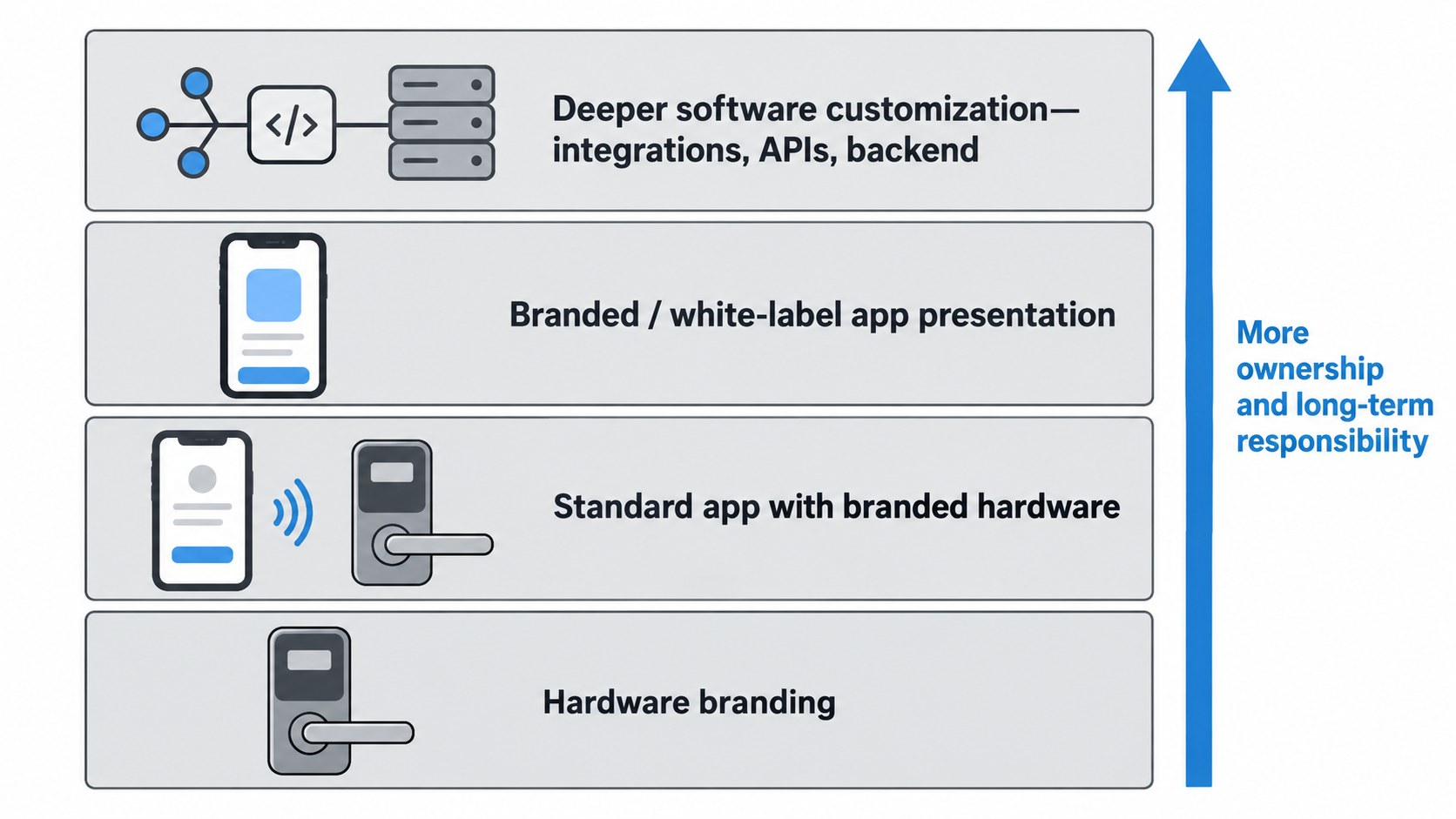
Separate branding into four layers:
- Hardware branding — visible identity on the physical lock.
- Standard platform use — branded hardware on an existing app or platform, with no app identity of your own.
- Branded or white-label app presentation — your app name, icon, colors or other presentation elements, within the limits of the platform.
- Deeper software customization — new functions, integrations, workflows, APIs, or software architecture beyond normal visual branding.
Platforms use other names; the four layers keep “custom app” from covering very different scopes.
| Branding scope | What you get | Main dependency | What must be confirmed |
|---|---|---|---|
| Hardware branding | Logo/marking on the lock, selected visible finish or product identity | Physical model and manufacturing process | Placement, method, finish, model scope, approval reference |
| Standard app + branded hardware | Your brand on the lock, existing platform/app on the phone | The model's hardware/software version | App name, functions for that version, gateway needs, region/account assumptions |
| Branded / white-label app | Your own app identity or visual presentation | Platform's OEM/white-label capabilities | What can actually change, store identity, account ownership, maintenance |
| Deeper software customization | New behavior, integrations, workflows, or backend requirements | Development capability, APIs/SDKs, platform architecture | Functional scope, ownership, support, updates, commercial responsibility |
The further a project moves from physical branding toward software, the more ownership and long-term responsibility matter.
2. Hardware Branding Is Usually the Easier Scope to Define
Hardware branding means a logo, mark, product name, color treatment or other visible identity on the lock. The marking method follows the model, material, finish and process, so the approval records:
- which physical model or panel is being branded;
- where the mark will appear;
- the expected size and orientation;
- the approved artwork file;
- whether the mark changes between front and rear hardware;
- whether the finish affects visibility or contrast;
- whether the marking is permanent or applied by another process;
- whether model or regulatory markings must remain separate;
- which sample or drawing represents the approved appearance.
The approval names the physical configuration; a logo position approved on one panel is checked again on a model with different geometry. On our orders the logo is checked for size, position and contrast on the real surface, so it is approved on a physical sample.
Hardware branding does not define the digital experience
A lock can carry your name while the app carries the platform's. A standard platform app lets you launch quickly without app development; a dedicated branded app gives customers one consistent experience under your brand, and is scoped as its own software project. Distributors selling into a market where TTLock or Tuya is already familiar often keep the standard app; a brand selling a whole ecosystem under its own name tends to want its own.
3. “Supports an App” Does Not Mean “Supports Your Branded App”
This is one of the most important distinctions in an OEM project. A model that works with an app has a software route for that configuration. Changing the app name, icon, interface, store listing, account ownership or cloud relationship are separate capabilities of the platform. Our A2 IP66 waterproof smart lock, for example, comes in a Local version with no app, a Tuya version and a TTLock version; each runs the standard app of its platform until a separate software scope is agreed.
Standard app use
The simplest route is the platform that already goes with the chosen configuration: the app exists, so the scope is smaller. Software behavior still varies with model, firmware, account type, gateway, platform version and region, so the order settles:
- What app/platform does this configuration use?
- Which functions are available on this exact model?
- Does a required remote function need a gateway?
- Do account or region restrictions apply?
- Who provides setup documentation and support?
- What happens if the platform changes a feature later?
Branded or white-label app
“White-label” means different things on different platforms. Tuya's current official OEM App materials describe an app-building route that can customize brand-facing elements such as app name, logo, theme styles, and other configurable content. Tuya separately distinguishes its OEM App from deeper Custom App and App SDK routes.[1][2]
The general point: visual app branding and custom software development are different scopes. When “white-label app available” comes up, find out what it includes:
- Can the app name change?
- Can the icon change?
- Can colors or theme elements change?
- Can the login or splash experience change?
- Can device panels or navigation change?
- Can features be enabled or removed?
- Who owns the store listing?
- Who controls the developer account?
- Who maintains the app after launch?
Until those are answered, “white-label” is still only a label.
4. Know When Branding Has Become Software Development
A request moves beyond branding when it changes how the lock, app or system behaves. “Use our logo and app icon” is a different kind of request from:
- add a new credential workflow;
- connect the lock to your existing property-management system;
- create a new user-role structure;
- expose lock events through an API;
- create a custom gateway workflow;
- change how permissions are issued;
- build a separate cloud service;
- create a proprietary mobile app.
Those involve behavior, integration or architecture. Some are covered by settings the platform already offers; others need software or integration work, and we confirm which before quoting.
Know the depth before pricing
Software work brings dependencies that hardware branding never meets:
- platform licensing;
- developer-account access;
- API or SDK availability;
- firmware compatibility;
- gateway compatibility;
- app-store submission;
- backend services;
- testing;
- update responsibility;
- ongoing support.
Fees, MOQ, annual charges and lead times differ between projects, so they are quoted for the defined scope.
5. Clarify Who Owns the Accounts, App, and Service Relationship
App ownership and app branding are two separate questions. Your logo can be on an app while another party controls the developer account, store listing, cloud service, API credentials or admin access. That can work, as long as it is clear before launch.
Use an ownership and responsibility checklist
| Item | Question to settle | Why it matters |
|---|---|---|
| Apple Developer / App Store Connect account | Whose organization/account publishes the iOS app? | Controls submission, roles, transfer, updates |
| Google Play developer account | Whose account publishes the Android app? | Controls listing, release, transfer, permissions |
| App-store listing | Whose brand and contact details appear publicly? | Customer-facing identity and support |
| Cloud/service account | Who contracts for and administers the service? | Continuity, access, support, possible recurring obligations |
| API/SDK credentials | Who receives and controls credentials? | Integration and future development |
| Gateway/platform administrator | Who can configure or administer required service components? | Operational control |
| User/admin account model | Who can create, remove, or recover administrators? | Day-to-day control |
| Data access | What operational/user data can each party access? | Commercial control and privacy responsibilities |
| Update responsibility | Who prepares and releases app/software updates? | Long-term continuity |
| Exit/transfer path | What happens if the manufacturer, developer or platform relationship changes? | Business continuity |
Apple's App Store Connect documentation treats app ownership and Account Holder authority as explicit operational concepts, including a formal app-transfer process between accounts or organizations.[3] Google Play likewise provides a defined process for transferring apps between developer accounts and lists the account-level dependencies to update after transfer.[4]
If you expect to control the branded app long term, settle account ownership at the start.
Branding approval and ownership approval are different
You can approve:
- app name;
- icon;
- theme;
- screenshots;
- visible UI;
while still having no answer on:
- who controls publishing;
- who controls cloud credentials;
- who can issue API keys;
- who handles future releases;
- what happens if the commercial relationship ends.
Both the visible brand and the control questions need closing.
6. Check Platform, Model, Firmware, Gateway, and Region Dependencies
Tie the software scope to the configuration being bought. Models in one catalog can use different platforms and functions: the TTLock G1 apartment smart lock (G1-1) talks Bluetooth at the door, the Tuya Wi-Fi G1-2 uses the building's Wi-Fi. Record:
- exact lock model/configuration;
- firmware/version basis;
- app/platform;
- Bluetooth/Wi-Fi or other communication route;
- whether the function needs a gateway;
- the gateway model and platform;
- region/account restrictions;
- API/SDK availability, for an integration;
- whether the required function is standard, configurable, or custom.
Gateway requirements are function-specific
Whether a gateway is needed depends on the function; “app support” says nothing about it. Local functions work at the door; remote ones need a gateway or service. On our TTLock versions, remote access needs a TTLock gateway and Wi-Fi; Tuya Bluetooth versions are managed nearby, and we confirm the remote functions you need for the model and version you order. So describe the user outcome instead of asking “does it support an app?”, for example:
The project requires remote credential management and event review from outside the property. Please identify the exact lock configuration, platform, gateway/service requirement, and account assumptions needed for that workflow.
That gives the lock maker something concrete to confirm. Connection routes and gateways are covered in app and gateway planning.
7. Define Maintenance and Update Responsibility Before Launch
Hardware branding is approved once as a physical deliverable; software keeps changing. Phone operating systems and app-store rules change, platforms update SDKs and services, firmware changes, bugs need fixing, and cloud and gateway services need running. A branded-app project names who does the post-launch work:
- Who builds new app versions?
- Who submits updates to Apple and Google?
- Who responds to store-review issues?
- Who handles operating-system compatibility problems?
- Who handles bugs?
- Who maintains API/SDK integration?
- Who coordinates firmware compatibility?
- Who maintains cloud or gateway services?
- Who supports end users or distributors?
- Which responsibilities are included and which require a separate agreement?
Tuya's current OEM App documentation, for example, describes a managed OEM App route with platform-based creation, publication support, and ongoing version updates.[1]
A branded app keeps needing work after the first release is published.
Separate one-time scope from recurring responsibility
In the quotation, separate:
One-time project work, such as the first hardware artwork, the initial app branding setup, the first integration or launch preparation.
Recurring or future work, such as platform and cloud service, app updates, technical support, account renewals, integration maintenance or new features.
The quotation or project agreement states who pays for and who performs each.
8. Approve Each Branding Layer Separately
“Branding approved” on its own says too little. Name what was approved:
| Approval layer | Example approval question | Possible status |
|---|---|---|
| Hardware mark | Is the logo position, size, appearance, and physical model correct? | Approved / Revise / Open |
| App identity | Are name, icon, theme, and visible brand elements correct? | Approved / Revise / Open |
| App function | Does this configuration provide the required behavior? | Approved / Revise / Open |
| Account/control | Are developer, admin, cloud, API, and store responsibilities clear? | Confirmed / Open |
| Service responsibility | Are update, maintenance, support, and continuity responsibilities defined? | Confirmed / Open |
| Packaging | Is packaging/private-label artwork complete? | Route to packaging owner |
That keeps an approved app look from being mistaken for settled cloud ownership or maintenance. Packaging (box artwork, manuals, labels, barcodes, print proofs, final files) is approved separately from app branding.
9. Three OEM Branding Scenarios
Scenario 1: Branded hardware, standard app
A distributor wants its logo on the lock and is comfortable using the standard app of the chosen version, say TTLock on an A2.
The work is the physical branding, the configuration check, and product information that names the software route correctly. Often there is no business reason for a separate app.
Scenario 2: Branded hardware and branded app presentation
The lock and the app should carry the same brand. Before quotation, check that the platform supports that level of white-label presentation, and who controls store publication, accounts, updates and service continuity. The project is no longer only artwork.
Scenario 3: “Branding” that is really software development
A property-technology company wants its own user roles, event workflow, API integration and a connection to its management platform. A new app icon changes none of that. The project is scoped as integration or custom software, with API/SDK, ownership, maintenance and support settled before commercial approval.
10. What to Confirm Before Requesting an OEM Branding Quote
Before asking for a final quotation, describe the branding scope in plain language. For hardware, define the model, visible branding requirement, finish, artwork, and approval reference.
For software, define whether the project needs:
- standard platform use;
- your own app presentation;
- feature configuration;
- new features;
- API/SDK integration;
- or a substantially custom software/service route.
Then confirm:
- which platform goes with the chosen configuration;
- what can actually be branded or changed;
- whether a gateway or other service is required;
- who owns developer and administrator accounts;
- who controls app-store publication;
- who controls cloud/API credentials;
- who performs updates and maintenance;
- which recurring services are involved;
- what is included in the quoted scope;
- what remains open.
A quotation can only cover the branding project that has been defined.
References
- Tuya. OEM App Solution.
- Tuya Support. What is the difference between the OEM App, Custom App and the SDK App?.
- Apple Developer. Overview of app transfer — App Store Connect.
- Google Play Console Help. Transfer apps to a different developer account.