Article contents 20 sections
A smart lock RFQ that produces comparable quotes has five parts: a project brief, a door schedule with an ID for every opening, the functions each door needs, the drawings and photos, and a fixed format for the answer. Those give every bidder a common basis for pricing the same doors, kit and services, and make their assumptions and exclusions easy to compare.
A product photo and a total quantity are not enough. One bidder quotes the outside and inside panels only, another adds the mortise body and installation kit, a third assumes you provide the gateways, accounts and commissioning. The prices look comparable but describe three different purchases.
Below we go from the first brief to the supplier responses, the pilot and the purchasing record, with an RFQ checklist and a completed 24-door example you can adapt.
What Belongs in a Smart Lock RFQ Package?
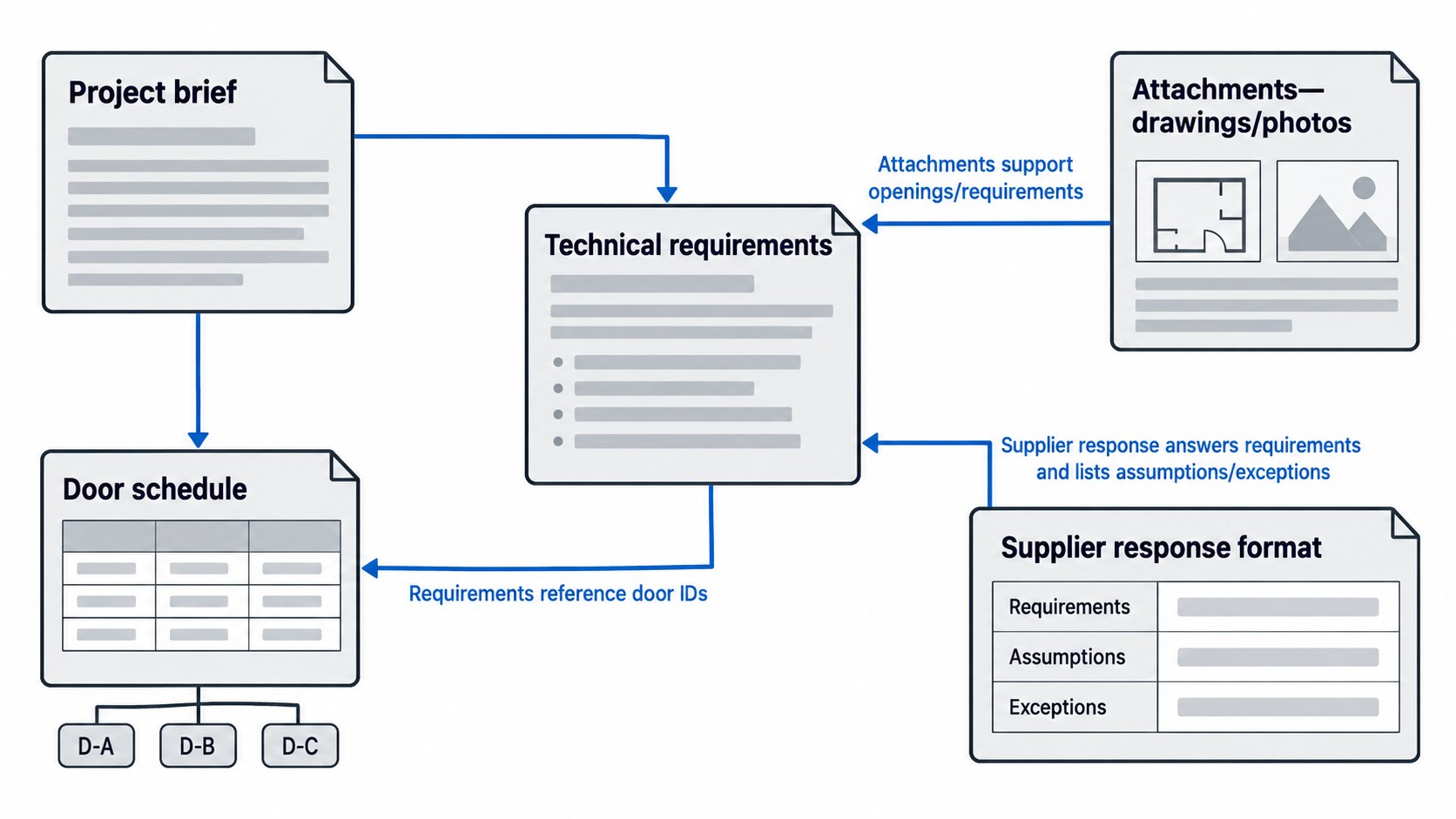
The project brief explains the location, application, quantity, timetable and procurement scope. The door schedule identifies individual openings and how they differ. The technical requirements describe the required operation and interfaces. The attachments provide drawings, photographs and other supporting information. The response format tells suppliers how to state their proposed configuration, price, assumptions and exceptions.
These documents work together. A requirement such as “local card access must remain available during an internet outage” belongs in the functional specification. The door schedule identifies the openings to which it applies. The supplier response identifies the proposed configuration and explains how that requirement is met.
On a small project the package is a short document, one spreadsheet and a few drawings; larger projects split the schedules and technical sections. Either way, each document refers clearly to the others.
Start by Stating What Kind of Quotation You Need
Budget Estimate
A budget request helps assess feasibility or funding before every opening has been surveyed. Provide the known quantities, representative door types, required functions and likely scope. Mark estimates as estimates; each bidder then states the assumptions behind its price range.
For example, a budget can be based on an assumed door-thickness range, with the survey to settle the final mounting kit. A good budget reply lists which missing information would change the price, configuration or delivery, and what a firm quotation needs.
Formal Procurement RFQ
A procurement RFQ needs a sufficiently defined configuration and scope for bidders to price the same requirement. Provide the issued door schedule, applicable drawings, required functions, delivery arrangement and response instructions.
Items still open are priced as a stated allowance or a separate option. A fit-critical dimension that is still unknown is listed as open, and a blanket “compatible” covers nothing.
Production Release
A quotation does not release production or door modifications. Before release, close the items that affect the supplied configuration, fabrication, approvals and acceptance.
Put the release conditions in the RFQ, such as drawing review, sample approval or a pilot, so that bidders allow for them and say whether their lead time runs from the order or from technical approval.
Define the Project and Supply Scope
Identify the project location and building use, whether the work is new construction or replacement, and whether doors remain occupied during installation. Explain the expected delivery phases and the party receiving the goods.
Then define what is being purchased. “Smart lock set” needs an explicit contents list: panels, lock body, cylinder, keys, spindles, mounting hardware and strike, as the model has them. Power components, gateways, credentials and installation services are either included or priced on their own lines.
Separate the base purchase from options. A gateway needed for a mandatory remote-access function belongs in the base; an optional remote-management feature stays out of it. On a TTLock version of our locks, for example, remote access needs a TTLock gateway and Wi-Fi, so a site that requires remote access prices the gateways in the base.
Keep spares separate from installed quantities: 40 doors and two service kits are 40 installed locks plus two spares. Say whether pilot units become part of the installation or are extra samples, or bidders will count them differently.
Build the Door Schedule Around Actual Openings
A door schedule gives each opening an ID that lasts from survey to installation and maintenance. Room names are not enough: they change, and one room can have several doors.
Record the opening ID, location, door type, leaf arrangement, dimensions, existing preparation, frame or receiving condition, required hardware function and special constraints. For double-leaf openings, identify the active and inactive leaves and the parts associated with each.
Group doors only when the conditions that matter are the same; similar-looking doors differ in thickness, profile space, handing, cutouts or function. Groups simplify the order, but keep the individual door IDs and exceptions.
Separate three kinds of information:
- Surveyed conditions: what is physically present, such as door thickness and existing lock preparation.
- Project requirements: what the opening must do, including access and inside operation.
- Proposed product data: the supplier's offered hardware, dimensions and configuration.
That keeps a product dimension from being mistaken for a site measurement, and lets bidders offer different assemblies against the same requirements.
The U.S. Unified Facilities Guide Specification for door hardware illustrates the relationship between numbered doors and hardware sets, and separates schedules, shop drawings and product data. UFGS 08 71 00 — Door Hardware
Columns and grouping rules are covered in building a door schedule for a smart lock project.
Describe Physical Compatibility with Drawings and Measurements
For replacement work, supply clear views of both door faces, the edge, the existing lock body, the strike and the frame, with measurements from stated reference points. A photo without scale shows the layout; the dimensions need a tape or a drawing.
The fields are door thickness, stile width, backset, operating centers, lock-body envelope, faceplate, fixing positions, spindle and cylinder; a surface-mounted rim lock needs fewer of them than a mortise lock.
Hardware makers' own purchase checklists list door thickness, spindle size and handle-to-cylinder centers as separate inputs, because one nominal lock size does not describe an installation. HOPPE purchase checklist
Each bidder names the mating parts and any door preparation. “Fits standard doors” answers nothing when the order rests on an existing cutout or a narrow profile. Our A2 IP66 waterproof smart lock, for instance, takes 6068, 4585, Russian 6585 or Russian 6085 security door mortises, each with its own case and faceplate, so our response names the body per door group.
For new doors, identify who produces and approves the preparation drawing and when it must be available to the door factory. For replacement doors, identify which alterations are permitted and which require further review. Use the mortise, backset and lock-body guide for the detailed measurement and interface questions.
Door factories preparing new leaves will also want mortise coordination before door production and factory-installed vs site-installed locks.
Translate User Needs into Functional Requirements
A feature list describes what a product offers. A project specification explains what users need to accomplish and under what conditions.
Entry, Inside Operation and Relocking
State who needs access, which credentials they use and whether access is permanent, scheduled or temporary. Describe inside operation separately from entry. Specify the intended locking and relocking sequence, including any user action needed after authorization.
“Card access for staff” does not say who enrolls cards, whether access works locally, how cards are revoked or whether the inside needs a card. Each of those changes the system and the commissioning.
Note privacy, passage mode or override requirements and the doors they apply to; doors in one project rarely all behave the same.
Connectivity and Failure Conditions
Define local and remote functions independently, and have bidders say which functions need a phone connection, local network, gateway or internet service. Describe the behavior required during each interruption and after recovery. On our locks, fingerprints, PINs and cards already enrolled keep working within their validity when the network is down; remote changes need the connection.
Power failure, internet loss and a failed gateway are three conditions, and outside entry, inside release and mechanical backup are three paths. The RFQ requests the behavior of the mechanism in each, instead of a blanket “unlock on power failure”.
Where status reporting matters, request what is measured. A command acknowledgment, a motor position and a door-position signal are different facts; say which physical condition you need confirmed.
Administration and Software Support
Identify who will own the project account, issue credentials, remove users and receive administrative control at handover. Suppliers state the platform, region, account and gateway dependencies, together with charges or service requirements that affect the purchase.
For connected products, request information on authorized configuration, software updates and available device-status information. NIST's IoT capability baseline identifies these as relevant capability areas; use it to structure the questions. NISTIR 8259A
The full cybersecurity and privacy review sits with the project requirements; in the RFQ, name the deliverables and the reviewer instead of accepting “secure platform”.
Identify Special Opening Requirements Early
Flag fire-rated openings, required egress routes, accessible door use and other project-specific restrictions in the schedule. Identify the applicable project requirements and the person responsible for reviewing the complete opening.
A lock's own certificate covers the lock; the opening is reviewed as a whole. UL's doors and hardware guidance looks at the application, the certification information and the other components together. UL Solutions doors and related hardware application guide
Request documents that match the offered configuration and its installation restrictions; a certification logo on a brochure is no substitute. A project drawing cannot override a product's listing restrictions either.
List the information the reviewer needs and the hold points before preparation or supply. Detailed coordination belongs in the fire-door, egress and accessibility guide.
The narrower questions have their own guides: fire-rated doors: listing and modification review, egress and emergency release coordination and fail-safe vs fail-secure locking.
Smart Lock RFQ Information Checklist
Use the fields that apply to your project, and mark which inputs are confirmed and which are pricing assumptions. Each bidder flags missing information that changes its response.
| Information to provide | Why it affects the quotation | What the supplier should return |
|---|---|---|
| Project location, use and procurement stage | Establishes application and quotation basis | Applicable offer scope and stated assumptions |
| Opening IDs, quantities and delivery phases | Defines installed quantities and shipment groups | Quantities and pricing by opening or hardware group |
| Door type, dimensions and existing preparation | Determines physical fit and installation parts | Proposed configuration and required preparation |
| Frame, strike and leaf arrangement | Affects receiving hardware and operation | Matching components and installation conditions |
| Entry credentials and inside operation | Determines lock function and user workflow | A response to each required operating function |
| Local, remote and interruption behavior | Determines system dependencies | Connection path, required equipment and limitations |
| Power arrangement | Affects hardware, wiring and maintenance scope | Included power parts and buyer-provided requirements |
| Project review and document requirements | Defines documentation and approval effort | Applicable documents and any gaps |
| Installation and commissioning responsibilities | Prevents missing services between contractors | Included work, exclusions and required coordination |
| Finish, branding and documentation languages | Affects variants, samples and production setup | Offered finish, artwork process and document scope |
| Packing, labeling and receiving requirements | Affects kit assembly and shipment handling | Packing arrangement, labels and associated charges |
| Pilot and acceptance requirements | Affects samples, timing and release conditions | Proposed test support, milestones and deliverables |
| Spares, warranty and support requirements | Identifies service expectations and separate costs | Parts information, warranty terms and support scope |
| Commercial response instructions | Makes offers easier to reconcile | Currency, price basis, validity, lead times and exclusions |
Send the checklist with the door data and an attachment index; questions without the drawings to answer them leave bidders guessing.
Make Supply and Installation Responsibilities Explicit
Name who supplies, installs, connects, configures and checks each part; they are often different companies even when a quote calls the package complete. For wired hardware, draw the line between the lock maker, door factory, electrician and access-control integrator. For battery locks, assign the first batteries, commissioning and maintenance; battery locks still need coordination.
One allocation:
| Work item | Assigned party in this example | Expected deliverable |
|---|---|---|
| Opening survey | Buyer's site team | Identified openings, dimensions and condition photographs |
| Proposed lock and mating parts | Lock supplier | Configuration and compatibility response |
| Door preparation | Door contractor | Preparation to the accepted drawing for each opening |
| Building network | Buyer's IT team | Required network availability and connection information |
| Hardware installation | Installation contractor | Installed assembly and installation checks |
| Credential and account setup | Buyer's administrator with supplier support | Agreed permissions and demonstrated management access |
| Pilot review | Buyer and designated technical reviewers | Results, issues and deployment decision |
| Final records | Each supplying or installing party | Updated configuration and assigned handover information |
The table exposes gaps: if everyone excludes gateway setup, commissioning has no owner; if two parties include the same power part, find out whether it is a duplicate.
Organize Attachments by Purpose and Revision
The attachment index lists each file's title, ID, revision and purpose. The door schedule can be Revision C and the drawing Revision 04; what matters is that the issued versions agree with each other.
Keep the files that state the requirement separate from the files that answer it. Drawings set geometry and preparation, functional requirements set behavior, product data describes the offered assembly, test reports and certificates cover their own scope, and samples are references for the features actually reviewed.
If the project has a document-precedence rule, state it, and settle conflicts with a formal clarification or amendment. When one schedule says local-only and another attachment asks for remote unlocking, name the affected doors and issue one corrected requirement, so that every bidder prices the same reading.
Samples answer different questions too: a finish sample settles appearance, a fitted assembly settles an interface, a pilot tests an installed condition. Approving one does not approve the rest.
Require a Supplier Response That Can Be Checked
Bidders answer each requirement and name the exact configuration they price, using categories such as meets, deviation, alternate, excluded and needs clarification, each with an explanation. Each answer names the line, the offered behavior or item, and the price or schedule effect. “Yes, supported” is incomplete when it needs extra equipment or a paid service.
The level of detail to ask for:
| RFQ requirement | Example supplier response | Buyer review |
|---|---|---|
| Local staff credentials must work during internet loss | Meets requirement for the offered configuration; remote commands remain unavailable during the outage | Check against the documentation and the pilot test |
| Remote access is included in the base scope | Deviation: gateway and platform service are excluded from the base price and listed separately | Reconcile the mandatory scope before comparing totals |
| Complete installation kit for the scheduled door thickness | Meets requirement; kit contents and preparation drawing listed in the response attachments | Check the stated kit against each applicable door group |
| Buyer retains administrative control at handover | Requires clarification: buyer must create the project account before commissioning | Define who completes account creation and by when |
| Alternative finish requested as an option | Separately priced option; changes the quoted production lead time | Keep the base and alternative offers distinct |
Keep base and alternate totals separate. An alternate states how it differs, including any change to door preparation, power, operation or support, and is never swapped into the base price.
Ask for the Commercial Details That Change the Purchase
Request pricing by the unit being bought: individual component, complete lock kit, opening set or project service. Include quantities, currency and the contents of each priced line.
Separate recurring software or service charges from hardware and one-time setup, and have bidders list which project functions stop if a service lapses.
The quotation names the delivery terms, the delivery point and the trade term, and states which freight, duties, taxes and local services are included. A three-letter trade term does not settle every destination cost; the named place and the inclusions have to be written down as well.
Request quotation validity, payment milestones, sample charges and any tooling or artwork costs for the project. Lead time should identify its starting event and distinguish production from transit. If approval of drawings or samples is a prerequisite, it belongs in the timetable.
For warranty, request the coverage, when it starts, the exclusions and the claim process, plus part numbers for replaceable parts; ours covers qualifying material and manufacturing defects for three years from shipment. Spares quantities can follow later, using spare parts planning for smart lock projects.
A Completed Example: A 24-Opening Office Retrofit RFQ
The following project shows how the information fits together.
The owner is replacing access hardware on 24 existing single-leaf office and store-room doors. The project team has placed these outside the fire-rated and exit-door work package; six corridor doors are in that package and excluded here. That boundary belongs to this example only.
The request seeks a formal supply quotation for lock kits. Site installation is provided by the buyer's contractor. The base requirement is local card access for authorized staff, with inside operation defined by the project's accepted hardware function. Remote access is outside the base offer; suppliers can price it as a separate alternative.
| RFQ field | Completed example |
|---|---|
| RFQ identifier and issue | Office Retrofit RFQ-01, Issue 02 |
| Opening scope | D01–D18 offices; D19–D24 store rooms; 24 single-leaf openings |
| Grouped survey conditions | Office leaves: 45 mm nominal thickness; store-room leaves: 50 mm nominal thickness; individual measurements retained in the survey |
| Compatibility basis | Existing preparation and frame details in Survey S-01 Rev B and Drawing Set DR-01 Rev 03 |
| Base quantity | 24 complete kits, including the four kits used for the pilot |
| Base access requirement | Local staff cards; inside operating function as specified in the project hardware requirements |
| Supply contents | Lock assembly, matching receiving hardware and mounting kit, keys where part of the approved assembly, and English instructions |
| Credentials | 30 staff cards as a separate priced line; enrollment performed by the buyer's administrator |
| Remote alternative | Separately identify required devices, services, commissioning work and recurring charges |
| Delivery arrangement | Four pilot kits first; remaining 20 released following the agreed pilot decision |
| Packaging | Individual complete kits labeled to the assigned opening or accepted hardware group, with carton contents records |
| Spare parts | Separate optional quotation for replaceable parts compatible with the offered configuration |
| Response format | Configuration by group, requirement responses, base price, alternatives, exclusions and lead-time triggers |
The four pilot kits cover both door-thickness groups and the different handing conditions recorded in the survey. They count toward the 24 installed kits. The later supply balance is therefore 20 kits.
The 30 cards follow the staff count, so user numbers and door numbers stay separate.
Any preparation change is explained in the response. If an offered assembly needs a larger cutout on the store-room doors, that alteration and its cost are weighed before the configuration is chosen.
Lead times are requested from the drawing approval and the pilot release, so each bidder shows how the staged order affects production and delivery.
Plan the Pilot Before Committing to Full Deployment
State whether there is a pilot, who provides and installs the units, and how the result affects the rest of the order. Pick doors that represent the real differences; the easiest doors hide them.
Request support for the pilot activities: installation checks, normal access, inside operation, the interruption scenarios on the plan and administrative setup. Identify who records issues and who determines whether they have been resolved.
Define the possible decisions in advance: proceed, correct and retest, change the scope, or stop that configuration. Agree what happens to pilot units that are damaged, modified or kept, and which changes reopen the review, such as a different lock body, mounting kit, firmware or gateway. The detailed pilot plan follows once the candidate configuration is known.
Door selection, tests and the decision rules are covered in how to plan a smart lock pilot installation.
Set Acceptance Requirements Before the Order Is Placed
Factory inspection, receipt checks and installed-door checks answer different questions; specify each. Before shipment, check the configuration, functions, kit completeness, labeling and packaging. On receipt, the team checks shipment identity, quantity and condition. At installation and commissioning, it checks the actual opening, operation and administrative setup.
Use the pre-shipment inspection checklist to define the factory inspection scope. Keep the RFQ focused on what must be included, who performs it, what records are supplied and how discrepancies are handled.
Where a number matters, define the method. “Fast unlocking”, “long battery life” and “strong packaging” name wishes; a test names the conditions and the method.
State whether a failed inspection stops shipment and who can approve a deviation. That decision is yours, separate from the factory's own internal check.
Manage Clarifications and Changes Consistently
Set a quotation deadline and one route for technical questions. An answer that changes the common requirement goes to every bidder affected; one bidder's proprietary details do not.
Record what changed, which doors or quantities it affects and which documents it replaces, and have bidders acknowledge it. A revision that touches one door group names that group, so nobody reprices the whole project.
Before selection, line up each offer's configuration, scope, accepted deviations and price basis. An unanswered requirement stays open; a conditional item names its condition and the step it holds, such as production release.
The line-by-line comparison is covered in how to compare smart lock quotations.
Carry the Purchased Configuration into Handover
After selection, record the configuration ordered, the accepted deviations, the document versions and the delivery phases, and give the installers that record instead of a stack of superseded quotes.
For maintenance, request the door each lock is on, the product identity, the hardware and software configuration, replacement-part numbers, instructions and support contacts. Credentials and account details go through a separate, controlled handover.
NIBS describes COBie as a way to organize facility asset information for operation and maintenance, with the deliverables set during the project. Even without COBie, deciding early what handover data you need saves rebuilding it later. NIBS COBie guidance
Record approved changes made during installation, so the records match what is on the doors.
A Final Review Before Sending the RFQ
Read the package as a bidder would. Can they find every priced group, the required operation, the drawings and what they must supply? Do the response instructions bring out alternates, exclusions and recurring costs? Do the quantities separate installed doors, pilot units, credentials and spares? Do the drawings and schedules cite the issued revisions? And does each next step (fit review, pilot, production release, shipment inspection, handover) have its requirements and an owner?
Frequently Asked Questions
What is the difference between a smart lock specification and an RFQ?
The specification is one part of the RFQ. It defines what the product or opening must do and its interfaces; the RFQ adds the quantities, attachments and commercial instructions and asks for an offer.
Should I choose a lock model before preparing the RFQ?
Either works. Name a configuration when the project requires one, or describe the performance and interfaces and let bidders propose an assembly. In both cases, record the real door conditions and require an answer that names the configuration as well as the model.
Do the door schedule and drawings need the same revision number?
No. Each document keeps its own revisions; the RFQ index lists the versions issued together, and those versions have to agree. Conflicts are settled by a formal clarification; renumbering settles nothing.
Does approval of a sample prove that every project door is suitable?
No. It approves what was reviewed on that sample. A different preparation, handing, mounting kit or system configuration needs its own check, which is why the pilot uses representative doors and the schedule keeps each door's exceptions.
References
- UFGS 08 71 00 — Door Hardware. Project-editable guide specification illustrating door and hardware schedules, drawings and product-data requirements.
- HOPPE — Purchase Checklist. Separate hardware selection inputs, including thickness, spindle and operating-center information.
- NISTIR 8259A — IoT Device Cybersecurity Capability Core Baseline. General capability areas relevant to connected-device procurement questions.
- UL Solutions — Doors, Windows and Related Hardware Application Guide. Application and certification considerations for doors and associated hardware.
- NIBS — COBie. Organization and delivery of facility asset information for operation and maintenance.