Article contents 10 sections
To plan a smart lock sample order, start from the decision the sample has to support. Then name the exact configuration, list the parts that must ship with it, pick the door and use conditions it will be checked on, agree what you will check, and decide how the result is recorded.
A sample can arrive looking right and still answer nothing: the mortise is wrong for the reference door, the app runs on a different platform from the one you plan to sell, or the strike, spindle, cards, gateway or mounting parts are missing. A clear brief avoids that without turning the sample into a laboratory program. You don't need every detail ready: tell us the door type and what you want to evaluate, and we help choose the sample and prepare the matching parts. The steps before the sample (base model, door data, workstreams) are in the OEM smart lock project preparation checklist.
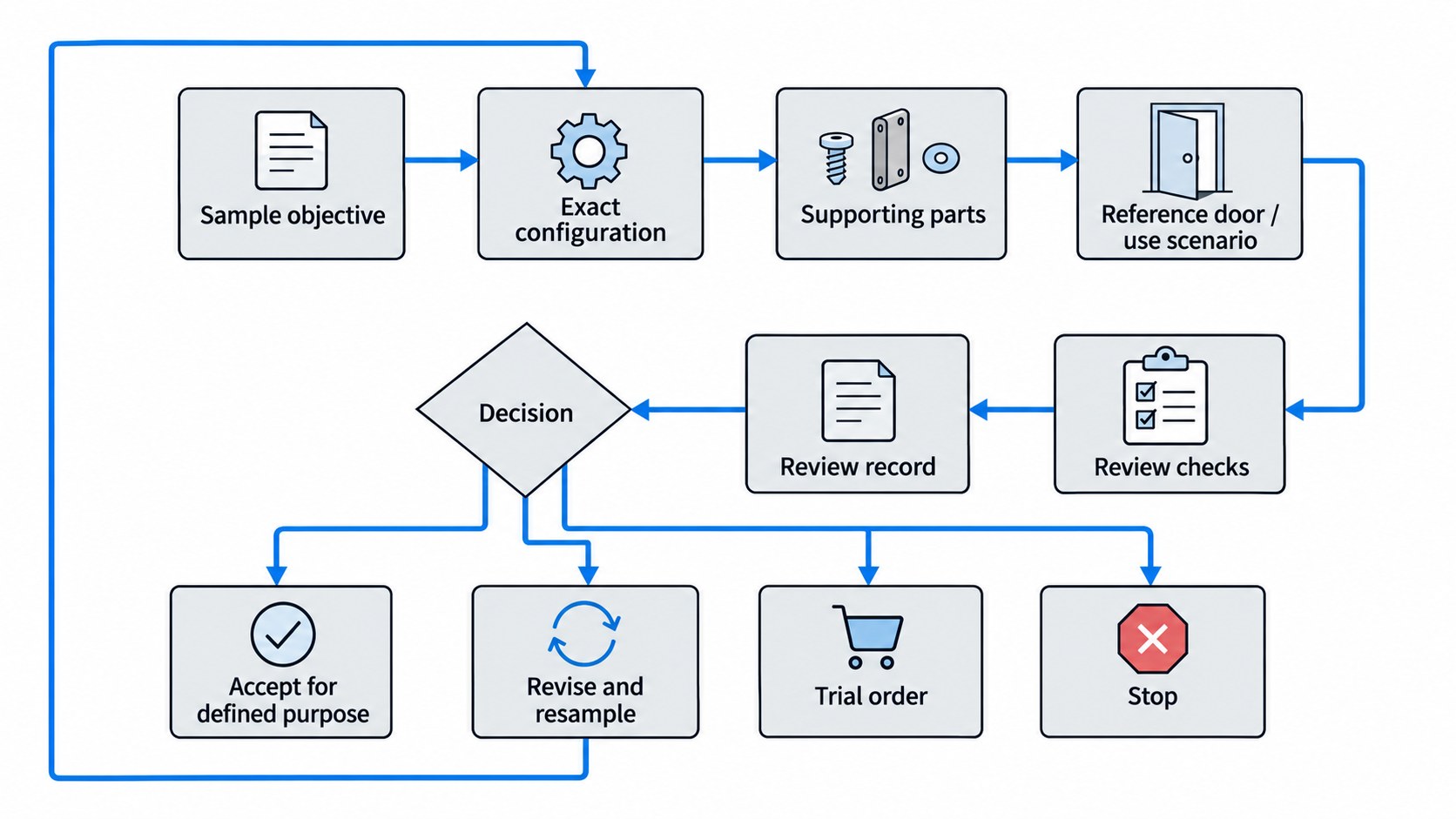
1. Define the Sample Objective Before You Decide Quantity
A sample for early product screening answers one question, and a sample for fit on a measured project door answers another. App behavior, visible branding, the go-ahead for customization and the later production reference are each their own question, and each needs its own sample brief.
With an unclear purpose, you can receive the right product for the wrong decision.
Start with one decision statement
Write the objective in one or two sentences before discussing quantity, for example:
Sample objective: show that this lock configuration fits the reference door, works with the required access methods, and installs with the planned mortise and strike before the project moves into private-label customization.
Or:
Sample objective: review this hardware configuration and its app and gateway behavior for the target use before deciding on a trial order.
Either is far more useful than “please send one sample for testing”: we can see what matters, and you can tell afterwards whether the sample succeeded.
Use an objective matrix
| Sample purpose | Main question | Inputs to define | What the sample can show | What it leaves for later | Likely next decision |
|---|---|---|---|---|---|
| Early product screening | Is this product family worth further evaluation? | Basic configuration, access methods, application | General product suitability, visible quality, basic operation | Final fit, final software scope, production consistency | Continue or stop |
| Engineering fit review | Will this configuration work on the reference door? | Door data, mortise/lock body, handing, dimensions, accessories | Fit, installation route, core function on the reference condition | All future doors, packaging, production repeatability | Revise, resample, or continue |
| Function/app review | Does this configuration deliver the required user experience? | Platform, version, gateway need, accounts, target functions | The listed functions on the sampled configuration | Every region, firmware version, future update, production consistency | Accept scope or revise |
| Branding/customization review | Is the visible customized result acceptable? | Logo/marking scope, finish, labeling, artwork status | Appearance and defined branding elements | Packaging release, software branding, mass-production consistency | Approve defined items or revise |
| Pre-trial-order review | Are the major technical unknowns closed enough to buy a small commercial batch? | Approved configuration, open-issue list, acceptance scope | Readiness for the next commercial gate | Consistency of future batches | Trial order, further sample, or stop |
A sample answers the questions for the next gate; the rest of the project has its own gates.
Let the objective drive quantity
One unit is often enough when one engineering team checks fit and basic function on one reference door. Order more when separate teams, locations, door types or test conditions are reviewed in parallel, and name the reason for each extra unit. Good reasons:
- separate mechanical and software review teams;
- different reference doors or openings;
- one unit reserved for customer presentation and another for engineering review;
- destructive or intrusive installation checks that prevent the same unit from serving another purpose;
- different configurations that must be compared.
2. Specify the Exact Configuration You Want to Receive
A sample means something only when both sides know which configuration it is. A model name and finish still leave several valid combinations of mortise, access methods, app platform, gateway, power and regional version, so name the configuration as precisely as the project needs before the order is released.
Configuration fields that may matter
For a typical smart lock, the configuration covers:
- product/model or product family;
- panel or hardware variant;
- finish;
- mortise or lock body;
- strike type;
- handing or opening direction;
- door thickness range or reference thickness;
- access methods required for the sample;
- cylinder and key arrangement;
- power source or battery format;
- emergency power arrangement;
- app/platform;
- firmware or configuration version if it affects the test;
- gateway requirement;
- region or account assumptions;
- indoor or outdoor use.
Every sample needs only the fields that change the meaning of its result. On our A2 IP66 waterproof smart lock, for example, the version (Local, Tuya or TTLock) and the mortise (6068, 4585, Russian 6585 or Russian 6085) both change it, so both are named on the sample order.
A model name is not the whole specification
Two samples with the same model name can differ where it matters: the same front panel on a different lock body, identical hardware on a different app platform, or another combination of access methods. Record any difference that changes fit, function, software behavior or the review before the sample ships.
Separate confirmed configuration from assumptions
Mark what is still open. Three states are enough:
Confirmed — both sides agree on the exact item.
Open — the choice is still to be made.
Assumed for this sample — the sample will use one temporary configuration so the project can answer a specific question.
The third state matters. You can check mechanical fit on a standard sample before choosing the final package or branded app, as long as everyone knows what the sample is meant to show.
3. Confirm What Must Ship With the Sample
The lock panels alone rarely let you review a project. For a fit or function review the sample usually needs the matching mortise or lock body, strike or strike plate, spindle, screws and mounting hardware, cylinder or keys, cards or tags, cables, gateway, manuals, or configuration information.
List the supporting parts the objective needs, so they ship with the lock.
Use a configuration and shipment-scope checklist
| Item | Required for this sample? | Exact version/configuration | Why it is needed |
|---|---|---|---|
| Front/rear lock hardware | Yes / No | Record model or variant | Main evaluation item |
| Mortise / lock body | Yes / No | Record exact type | Fit and installation |
| Strike / strike plate | Yes / No | Record matching type | Frame/closing evaluation |
| Spindle / mounting hardware | Yes / No | Record if special | Installation |
| Cylinder / mechanical keys | Yes / No | Record type | Mechanical override review |
| Cards / tags / credentials | Yes / No | Record quantity/type | Access-method review |
| Gateway | Yes / No | Record model/platform | Remote/app function review |
| Cables / accessories | Yes / No | Record exact items | Installation/function |
| Manual / setup instructions | Yes / No | Record language/version | Setup and user review |
| App/platform information | Yes / No | Record app/account details | Software review |
| Branding elements | Yes / No | Define scope | Appearance review |
| Packaging sample | Yes / No | Define scope | Packaging review |
Treat the table as a checklist to adapt: strike out what is irrelevant and add what the project needs.
Confirm the commercial details of the sample order
Before placing the order, confirm in writing:
- the sample cost and which accessories it includes;
- the estimated preparation and dispatch time;
- freight charges and the shipping arrangement;
- whether sample charges can be credited against a later order, as agreed for the project.
Match the shipment scope to the sample objective
For mechanical fit, the right lock body, strike, spindle and mounting parts matter more than packaging. For an app or gateway review, the sample is incomplete until you can reach the platform and gateway functions. For private-label appearance, the sample carries the logo and finish under review. In each case, the test is:
What must be physically or digitally available for this sample to answer its defined decision?
4. Match the Sample to the Door and Real Use Scenario
A lock that works on a desk can still fail as a project sample, so review it on the door and in the use it will see.
Use a real or controlled reference door
Where you can, test the sample on the project door itself or a controlled reference door that matches it. For our A2, that means the entrance door with the mortise you plan to use, checking panel coverage, lever feel, strike engagement and battery access.
Record the important characteristics, such as:
- door material and construction;
- thickness;
- opening direction;
- existing cutout;
- mortise or lock-body position;
- frame and strike condition;
- edge geometry;
- clearances;
- nearby trim or glazing;
- weather exposure, for outdoor doors.
A demonstration door is good for learning the product; fit is judged on the project door or one that matches it. For projects with accessibility requirements, use the applicable local standard; the U.S. Access Board, for example, defines how clear door width and maneuvering clearances are measured.[1]
Check the installation route before the sample arrives
Know in advance whether the review needs:
- a new cutout;
- modification of an existing opening;
- a different strike;
- cable routing;
- a special cylinder;
- a gateway;
- an app account;
- credentials;
- or other preparation.
Then no review time is lost once the sample arrives. Our installation guide covers door measurement and preparation.
Separate fit from function
A sample can pass one and fail the other: the hardware fits the door while the app falls short, or the access functions work on the bench while the mortise, strike or handle is wrong for the opening. Record them as separate decisions, so the next step shows whether a problem is mechanical, software, configuration or outside this sample's objective.
5. Decide What You Will Check Before the Sample Arrives
Decide what “good” means before the package is opened. The review scope can be a short list, as long as it tells an acceptable result from an unresolved one.
Mechanical and installation checks
Review:
- whether the supplied lock body matches the expected configuration;
- whether panel and lock-body geometry align with the reference door;
- whether spindle, cylinder, cables, screws, and strike can be installed as intended;
- whether the handle and latch operate without obvious binding;
- whether the door closes and latches correctly;
- whether installation introduces unexpected interference.
A desk check flags fit questions; the detailed engineering review answers them.
Access-method checks
Check the access methods that are part of the sampled configuration:
- fingerprint;
- PIN;
- card/tag;
- mechanical key;
- app;
- gateway-assisted remote functions.
A function outside the sampled configuration is outside the review.
App and gateway checks
If software behavior is part of the objective, list what must be demonstrated on the sampled configuration. Platform documentation describes what a platform can do; for example, Tuya describes its OEM App as a platform-specific route for configuring and publishing a branded app.[3]
Typical items:
- device pairing;
- credential creation;
- temporary access;
- event records;
- remote operation;
- gateway communication;
- account roles;
- region-specific account behavior.
A gateway belongs in the sample when the target function needs one, as remote access on a TTLock version does; many samples need none. On apartment locks such as the G1 apartment smart lock, add a test user, remove them and check that the lock then rejects them.
Power and daily-use checks
Review:
- battery installation;
- power-up behavior;
- low-power indication;
- emergency power function (on our locks, the 5 V Type-C port and the mechanical key);
- locking/unlocking cycle;
- handle operation;
- obvious usability issues during repeated everyday use.
A short review finds immediate configuration and usability problems; long-term durability comes from cycle testing on representative samples.
6. Record Results, Not Impressions
“Looks good” records nothing. Months later, the record should still show what was checked, under what conditions and what was left open. For the software-security part of an evaluation, NIST SP 800-115 provides guidance on planning technical security tests and analyzing findings.[2] Mechanical fit and appearance checks need criteria set for the project.
Use a sample review record
| Field | Record |
|---|---|
| Sample ID | Model/configuration identifier |
| Date received / reviewed | Date |
| Quotation reference | Quote, order, or sample reference |
| Door/use condition | Reference door, environment, platform/account |
| Hardware configuration | Mortise, finish, access methods, power |
| Software configuration | App/platform/version/gateway where relevant |
| Checks completed | Short list of checks actually performed |
| Photos/videos | File references |
| Accepted items | What passed for the defined objective |
| Open issues | What is unresolved |
| Required changes | Exact revision requested |
| Reviewer / decision owner | Name or role |
| Decision | Reject / revise / resample / accept for defined purpose / move forward |
Someone who was not there should be able to follow the decision from the record.
Photograph what the decision rests on
Depending on the issue, photograph:
- lock and door together;
- door edge;
- mortise/lock body;
- strike alignment;
- cutout;
- cable path;
- hardware interference;
- screen/app state;
- branding position;
- label or packaging detail.
Separate accepted items from open items
A sample can be accepted for one purpose with other items still open:
- mechanical fit accepted;
- fingerprint and PIN accepted;
- app account structure still open;
- branding still to be reviewed;
- packaging still to be reviewed.
That says more than “sample approved” or “sample failed”.
7. Separate Approval Scope From Open Issues
“Approved” causes trouble when nobody says what was approved. Appearance can be approved with fit still open, hardware with software unresolved, the configuration with packaging still standard. So the approval names its scope.
Use scoped approval language
Instead of:
Sample approved.
Use:
Hardware configuration accepted for the measured reference door. App account ownership and final packaging remain open.
Or:
Mechanical fit and access methods accepted for this configuration. Branding requires revision before the next sample.
That wording keeps both sides from assuming the project is further along than it is.
Decide what is blocking the next step
Only some open issues stop the project. Artwork can wait during an engineering sample; a wrong mortise blocks fit approval; a missing gateway blocks the remote-function review but not the mechanical check. If an issue blocks the next decision, resolve it first. If not, record it against the later gate where it matters.
8. Decide Whether to Accept, Revise, Resample, Trial-Order, or Stop
A sample order is finished when its result changes the project status, not when testing ends.
Common outcomes
| Outcome | When it makes sense | Next action |
|---|---|---|
| Reject base configuration | Product cannot meet a core requirement | Select another base product/configuration |
| Revise and resample | Problem appears correctable but affects the decision | Define exact changes and order the next sample |
| Accept for a defined purpose | Sample closed the intended question while other items remain open | Move only the approved scope forward |
| Move to customization | Base hardware/function is acceptable and customization is the next decision | Define branding/software/packaging scope |
| Move to trial order | Major sample-stage unknowns are closed enough for a small commercial batch | Confirm commercial and quality conditions |
| Stop | Product or project no longer makes commercial sense | Close the evaluation |
Match the next step to what the sample showed. If it meets your main requirements, a trial order is the natural next step, and we confirm any remaining details before production; one small non-blocking item goes on the open list without another sample.
When should you resample?
Resample when the revision changes something that has to be checked physically or functionally again, such as:
- different mortise or lock body;
- revised hardware geometry;
- changed access-method configuration;
- software/platform change that affects your core function;
- finish or branding change that must be physically approved;
- installation revision that changes the door interface.
A document correction or commercial clarification usually needs no new sample. The test is whether the change raises a question the existing sample cannot answer.
9. What Sample Approval Does Not Prove
A sample tells you about that unit, that configuration and those review conditions. It does not prove that:
- every future unit will be identical;
- the production BOM is frozen;
- future firmware or app behavior will remain unchanged;
- every project door will fit;
- the final package is approved;
- all market/compliance requirements are closed;
- a production lot will match the reviewed unit;
- later production changes are controlled.
Those belong to later stages: sample approval and production approval are two separate decisions. Before repeat orders, set up the production reference and change control described in from golden sample to mass production: baseline and change control. The Canadian door brand on our development capabilities page went through three samples and two rounds of appearance approval before its version was frozen in January 2025, three months ahead of the first delivery.
References
- U.S. Access Board. Chapter 4: Entrances, Doors, and Gates. Definitions for clear width and maneuvering clearances used when an accessibility review applies.
- NIST. SP 800-115: Technical Guide to Information Security Testing and Assessment. Planning and findings analysis for technical information-security testing.
- Tuya. OEM App Solution. Platform-specific app configuration and publishing.