
Technology Guides / Decision Guide
Smart Lock Backup Access and Emergency Power Guide
A smart lock selection is incomplete until the low-battery and failure-recovery path is clear. Backup access should be practical for the real door and operator.
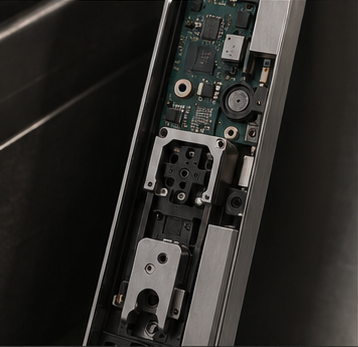
Mechanical key location, cylinder type and key-control policy
External emergency-power port and compatible power source
Low-battery warning method and battery-replacement responsibility
Administrator recovery, reset and account-access process
Decision Context
What This Guide Helps You Confirm
Backup access may include a mechanical key, external emergency power, administrator reset or another local credential. The available combination varies by model and must remain accessible after installation.
For apartments, hotels and managed projects, the operational question is who holds the key, who receives low-battery alerts and how staff reaches the door without weakening security controls.
The image slot is reserved for product structure, door condition, material, installation, OEM or quality evidence related to this guide.
Evidence Workbench
Connect the Written Checklist to the Real Product or Door
Use the selected model, representative door and available documents together. Avoid treating a generic image, one feature name or one test value as a complete purchasing decision.
- Keep the candidate model and configuration visible.
- Use labeled photos or drawings instead of loose descriptions.
- Record uncertain items for confirmation before quotation.
- Retain the approved evidence for sample and production review.
Decision Table
Backup Route Planning
Use the table to compare options on the same physical, operational and evidence basis.
| Failure case | Primary response | Backup question | Site responsibility |
|---|---|---|---|
| Low battery warning | Replace batteries before lockout. | How is the warning shown or reported? | Assign inspection and replacement intervals. |
| Battery depleted | Use external emergency power where supported. | Is the port reachable after installation? | Keep the correct power source available. |
| Electronic fault | Use mechanical key or approved service procedure. | Who controls and stores the key? | Document access authorization. |
| App or network unavailable | Use local PIN, card, fingerprint or key. | Which methods work offline? | Train operators on the offline workflow. |
Buyer Process
Build a Recovery Procedure
Move from site or project evidence to a documented model and supply decision.
Include low battery, lost phone, network outage, damaged keypad and administrator turnover.
Confirm which local or physical route works for the selected model.
Ensure keyway and emergency port remain accessible on the installed door.
Define who holds keys, changes batteries and manages accounts.
Run the procedure on a sample and include it in handover materials.
Evidence Boundaries
What This Guide Should Not Be Used to Assume
These cautions keep material, technology, installation and report language tied to the selected model and real site.
Door trim, gate geometry or protective covers must not block the mechanical cylinder.
It generally provides temporary operating power; follow the model instructions.
Understand the consequences before using factory reset as routine recovery.
Related Routes
Continue the Decision With the Next Useful Page
Use related guides, product pages and support routes to close the remaining questions.
Buyer FAQ
Questions Buyers Ask Before Confirmation
Answers stay cautious where model, market, door or final configuration can change the result.
Can a smart lock open when the batteries are dead?
Many models provide emergency power or mechanical key access, but the exact route must be confirmed and tested by model.
Where should the mechanical key be stored?
Use a controlled location accessible to authorized staff, not inside the locked property.
How often should batteries be replaced?
Follow model guidance and local usage conditions. High traffic, climate and battery quality can change replacement intervals.
Ready to Confirm?
Treat backup access as part of the product specification.
Tell us the site, operator and preferred recovery route. SivoLock can confirm the backup options on the selected model configuration.
Buyer action block
Convert Smart Lock Backup Access and Emergency Power Guide into a usable inquiry note.
Use this article to prepare a concrete next step: copy the relevant facts into an RFQ, attach evidence and ask for selected-model confirmation.
Include application, door data, model preference, quantity, market and the exact document or evidence requested.
Door photos, measurements, drawings, sample records and artwork files reduce back-and-forth.
If the article mentions a report, certification, IP rating or test, request availability for the exact SKU.
| Decision area | Confirm before quotation | Claim boundary |
|---|---|---|
| Inquiry line | We are reviewing Smart Lock Backup Access and Emergency Power Guide; please confirm the suitable SivoLock model route. | Turns the article topic into a sales-ready question. |
| Required inputs | Door/application details, target market, quantity, sample timing and preferred functions. | Makes the response practical rather than generic. |
| Evidence request | Datasheet, installation guide, report availability, sample photos or approval files as relevant. | Ties documents to the selected model. |
| Next page | Continue to product, material, support or contact pages after the open questions are listed. | Improves internal navigation without forcing a false answer. |
Can this page replace a final datasheet?
No. Use it to prepare the buying conversation, then confirm selected-model values, reports and packaging details from the latest SivoLock response.
What happens when a value is not available yet?
Leave it open and mark it as configuration-dependent. Do not turn missing certification, IP, factory or test evidence into a public claim.
Send the confirmed inputs and keep any missing proof as an open request. SivoLock can respond with model-specific options, document availability and quotation questions.