
Quality & Certification Guides / Decision Guide
Smart Lock IP Rating and Waterproof Report Guide
An IP code describes defined ingress tests. It does not by itself describe every outdoor installation, long-term corrosion risk or misuse condition.

Exact model and configuration shown in the report
IP code, standard, test laboratory and report number
Tested sample orientation and product/enclosure scope
Front panel, rear panel, connectors and emergency port exposure
Decision Context
What This Guide Helps You Confirm
Review the tested model, report number, enclosure or product scope, mounting orientation and test conditions. A front panel, complete lock or related enclosure may not have the same coverage.
Real sites add UV, temperature, salt, moving gates, cable routes, damaged seals and maintenance. Use the report as one evidence source within a complete outdoor review.
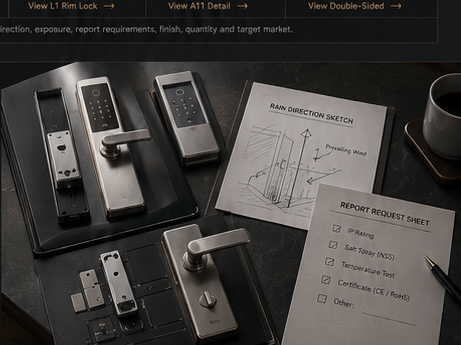
The image slot is reserved for product structure, door condition, material, installation, OEM or quality evidence related to this guide.
Evidence Workbench
Connect the Written Checklist to the Real Product or Door
Use the selected model, representative door and available documents together. Avoid treating a generic image, one feature name or one test value as a complete purchasing decision.
- Keep the candidate model and configuration visible.
- Use labeled photos or drawings instead of loose descriptions.
- Record uncertain items for confirmation before quotation.
- Retain the approved evidence for sample and production review.
Decision Table
How to Read an IP Claim
Use the table to compare options on the same physical, operational and evidence basis.
| Check | Report question | Site question | Decision use |
|---|---|---|---|
| Model identity | Does the report name the quoted SKU? | Is the ordered configuration the same? | Confirms relevance before interpreting the rating. |
| Test scope | Was a panel, enclosure or complete product tested? | Which parts are exposed on the installed door? | Prevents extending evidence beyond its scope. |
| Test condition | What water direction, duration and setup were used? | Is the site sheltered or directly exposed? | Compares laboratory condition with real risk. |
| Installation | Were seals and mounting instructions part of the setup? | Can the site reproduce correct installation? | Makes installer controls visible. |
Buyer Process
Use IP Evidence in Product Selection
Move from site or project evidence to a documented model and supply decision.
Document rain direction, shelter, drainage, humidity and both panel exposures.
Match gate or door structure before reviewing reports.
Ask for the exact model, test standard and readable scope.
Identify conditions not represented by the laboratory test.
Follow sealing, cable, fastener and maintenance guidance.
Evidence Boundaries
What This Guide Should Not Be Used to Assume
These cautions keep material, technology, installation and report language tied to the selected model and real site.
Salt spray, material and finish questions need separate evidence.
Impact, wear, UV, temperature and incorrect installation are different risks.
Door fit, user workflow and maintainability still matter.
Related Routes
Continue the Decision With the Next Useful Page
Use related guides, product pages and support routes to close the remaining questions.
Buyer FAQ
Questions Buyers Ask Before Confirmation
Answers stay cautious where model, market, door or final configuration can change the result.
Does IP66 mean a smart lock can be installed anywhere outdoors?
No. It indicates defined ingress test performance, not unlimited exposure or suitability for every door and climate.
Should I ask for the full waterproof report?
Ask for readable evidence showing the tested model, standard, laboratory, conditions and result where available.
Is the rear panel included in the IP rating?
It depends on the tested product and report scope. Confirm which parts were tested and which parts will be exposed.
Ready to Confirm?
Match the report scope to the real installation.
Send the site photos and selected model. SivoLock can clarify available IP evidence and the installation conditions that still need review.
Buyer action block
Convert Smart Lock IP Rating and Waterproof Report Guide into a usable inquiry note.
Use this article to prepare a concrete next step: copy the relevant facts into an RFQ, attach evidence and ask for selected-model confirmation.
Include application, door data, model preference, quantity, market and the exact document or evidence requested.
Door photos, measurements, drawings, sample records and artwork files reduce back-and-forth.
If the article mentions a report, certification, IP rating or test, request availability for the exact SKU.
| Decision area | Confirm before quotation | Claim boundary |
|---|---|---|
| Inquiry line | We are reviewing Smart Lock IP Rating and Waterproof Report Guide; please confirm the suitable SivoLock model route. | Turns the article topic into a sales-ready question. |
| Required inputs | Door/application details, target market, quantity, sample timing and preferred functions. | Makes the response practical rather than generic. |
| Evidence request | Datasheet, installation guide, report availability, sample photos or approval files as relevant. | Ties documents to the selected model. |
| Next page | Continue to product, material, support or contact pages after the open questions are listed. | Improves internal navigation without forcing a false answer. |
Can this page replace a final datasheet?
No. Use it to prepare the buying conversation, then confirm selected-model values, reports and packaging details from the latest SivoLock response.
What happens when a value is not available yet?
Leave it open and mark it as configuration-dependent. Do not turn missing certification, IP, factory or test evidence into a public claim.
Send the confirmed inputs and keep any missing proof as an open request. SivoLock can respond with model-specific options, document availability and quotation questions.