
Application Guides / Decision Guide
Project Door Smart Lock Schedule Guide
A door schedule turns a multi-door project into controlled groups. It helps the buyer, door factory, installer and lock supplier work from the same assumptions.
Door ID, location, room or opening reference
Door material, thickness, profile and frame condition
Handing, swing direction, leaf type and active leaf
Mortise, backset, spindle, cylinder and keeper requirements
Decision Context
What This Guide Helps You Confirm
Group doors that share material, thickness, lock body, handing, finish and function package. Keep special doors visible rather than forcing every opening into one standard.
Use revision control and status fields. Surveyed, proposed, sample-approved and released doors are different project states and should not be mixed in one uncontrolled table.
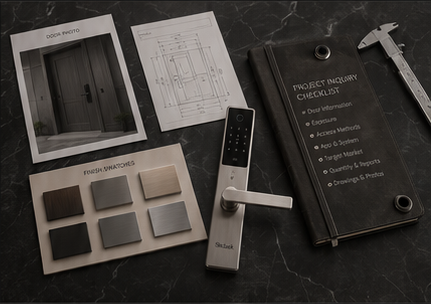
The image slot is reserved for product structure, door condition, material, installation, OEM or quality evidence related to this guide.
Supporting Evidence
Connect the Written Checklist to the Real Product or Door
Use the selected model, representative door and available documents together. Avoid treating a generic image, one feature name or one test value as a complete purchasing decision.
- Keep the candidate model and configuration visible.
- Use labeled photos or drawings instead of loose descriptions.
- Record uncertain items for confirmation before quotation.
- Retain the approved evidence for sample and production review.
Decision Table
Recommended Door Schedule Columns
Use the table to compare options on the same physical, operational and evidence basis.
| Column group | Fields | Decision supported | Owner |
|---|---|---|---|
| Door identity | Door ID, level, room, location and quantity. | Tracks each physical opening. | Architect/contractor. |
| Physical condition | Material, thickness, profile, handing and frame. | Controls compatibility and fabrication. | Door factory/site team. |
| Lock configuration | Model, mortise, finish, functions and accessories. | Defines supply scope. | Lock supplier/buyer. |
| Approval status | Survey, drawing, sample, change and release status. | Prevents unapproved production. | Project manager. |
Buyer Process
Turn the Schedule Into a Supply Control
Move from site or project evidence to a documented model and supply decision.
Start with current architectural or door-factory records.
Include mortise, backset, handing, access and wiring questions.
Create standard types while preserving exceptions.
Survey and sample the highest-risk groups.
Issue approved quantities, drawings and configurations for production.
Evidence Boundaries
What This Guide Should Not Be Used to Assume
These cautions keep material, technology, installation and report language tied to the selected model and real site.
Tie every issue to a revision date and project source.
Survey thickness, internal reinforcement and frame conditions.
Separate estimated, confirmed, spare and replacement units.
Related Guidance
Continue With Related Product and Project Guidance
Review related guides, product information and support options to close the remaining technical and purchasing questions.
Buyer FAQ
Questions Buyers Ask Before Confirmation
Answers stay cautious where model, market, door or final configuration can change the result.
Do I need a door schedule for a small project?
Even a simple table is useful when several doors differ in handing, thickness or function.
Who should own the schedule?
A project coordinator should control revisions while door, lock and installation teams own their technical fields.
How many doors should be sample-installed?
Test representative and high-risk types before bulk release, especially where door construction varies.
Ready to Confirm?
Send the door schedule before standardizing the lock.
Share the current door groups, drawings and access workflow. SivoLock can identify the fields needed for a controlled model and mortise recommendation.
Inquiry Preparation
Turn this guide into a clear supplier inquiry.
Summarize the relevant facts in your RFQ, attach supporting files, and request confirmation for the selected model.
Include application, door data, model preference, quantity, market and the exact document or evidence requested.
Door photos, measurements, drawings, sample records and artwork files reduce back-and-forth.
If the article mentions a report, certification, IP rating or test, request availability for the exact SKU.
| Decision area | Confirm before quotation | Claim boundary |
|---|---|---|
| Inquiry line | We are reviewing Project Door Smart Lock Schedule Guide; please confirm the suitable SivoLock model route. | Gives the supplier a clear, answerable request. |
| Required inputs | Door/application details, target market, quantity, sample timing and preferred functions. | Provides the technical and commercial context needed for a useful response. |
| Evidence request | Datasheet, installation guide, report availability, sample photos or approval files as relevant. | Keeps requested documents tied to the selected model. |
| Follow-up | Continue with the relevant product, material or support information after listing the open questions. | Keeps unresolved requirements visible for supplier confirmation. |
Can this guide replace a final datasheet?
No. Use it to prepare the buying conversation, then confirm selected-model values, reports and packaging details from the latest SivoLock response.
What happens when a value is not available yet?
Leave it open and mark it as configuration-dependent. Do not turn missing certification, IP, factory or test evidence into a public claim.
Send the confirmed inputs and keep any missing proof as an open request. SivoLock can respond with model-specific options, document availability and quotation questions.