
Installation Guides / Decision Guide
Replacement Smart Lock Compatibility Guide
A replacement is not defined by matching the front-panel shape. The existing door preparation, mortise and frame determine how cleanly a new lock can be installed.
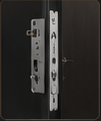
Existing front and rear panel dimensions and hole pattern
Mortise type, faceplate, backset, spindle and cylinder positions
Door thickness, material, internal cavity and reinforcement
Frame keeper, door gap, sag and latch alignment
Decision Context
What This Guide Helps You Confirm
A new panel may need to cover old holes, but coverage alone does not prove that spindle, cylinder, screws and mortise align. The door edge and frame are usually the controlling evidence.
Decide whether the project allows drilling, filling, welding or decorative cover plates. A retrofit with no visible modification has a narrower product range than a planned door refurbishment.
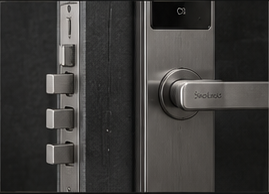
The image slot is reserved for product structure, door condition, material, installation, OEM or quality evidence related to this guide.
Supporting Evidence
Connect the Written Checklist to the Real Product or Door
Use the selected model, representative door and available documents together. Avoid treating a generic image, one feature name or one test value as a complete purchasing decision.
- Keep the candidate model and configuration visible.
- Use labeled photos or drawings instead of loose descriptions.
- Record uncertain items for confirmation before quotation.
- Retain the approved evidence for sample and production review.
Decision Table
Replacement Compatibility Levels
Use the table to compare options on the same physical, operational and evidence basis.
| Level | Condition | Likely work | Approval evidence |
|---|---|---|---|
| Direct replacement | Key dimensions and mortise positions align. | Limited adjustment and normal fitting. | Overlay drawing and test installation. |
| Adaptable replacement | Main structure fits but holes or keeper need change. | Drilling, filling or cover plate. | Door-factory or installer method statement. |
| Major conversion | Mortise, panel or frame structure differs significantly. | New pocket, reinforcement or metal work. | Detailed drawing and sample-door trial. |
| Not recommended | Door structure or exposure conflicts with candidate model. | Excessive risk or unreliable mounting. | Select another lock direction or replace door preparation. |
Buyer Process
Review a Replacement Before Ordering
Move from site or project evidence to a documented model and supply decision.
Photograph all sides, edge, frame and visible holes.
Record thickness, backset, mortise and centerlines.
Clarify what the installer or door factory can change.
Compare panel coverage, fixing points, mortise and keeper.
Complete and document a sample installation before bulk conversion.
Evidence Boundaries
What This Guide Should Not Be Used to Assume
These cautions keep material, technology, installation and report language tied to the selected model and real site.
A larger panel may cover holes but still misalign the spindle or mortise.
Check reinforcement, rust, cracks and previous repairs after removal.
Survey representative units across the project, not only one door.
Related Guidance
Continue With Related Product and Project Guidance
Review related guides, product information and support options to close the remaining technical and purchasing questions.
Buyer FAQ
Questions Buyers Ask Before Confirmation
Answers stay cautious where model, market, door or final configuration can change the result.
Can a smart lock replace any mechanical lock?
No. Compatibility depends on door preparation, mortise, frame, thickness and allowed modification.
Can a cover plate solve old holes?
It can improve appearance in some projects, but it does not solve structural, mortise or alignment problems.
Should I test one door before ordering many locks?
Yes. A documented trial installation is strongly recommended for retrofit projects.
Ready to Confirm?
Trial the real replacement condition before bulk ordering.
Send the existing lock photos, measurements and modification limits. SivoLock can review whether a direct, adaptable or alternative route is more realistic.
Inquiry Preparation
Turn this guide into a clear supplier inquiry.
Summarize the relevant facts in your RFQ, attach supporting files, and request confirmation for the selected model.
Include application, door data, model preference, quantity, market and the exact document or evidence requested.
Door photos, measurements, drawings, sample records and artwork files reduce back-and-forth.
If the article mentions a report, certification, IP rating or test, request availability for the exact SKU.
| Decision area | Confirm before quotation | Claim boundary |
|---|---|---|
| Inquiry line | We are reviewing Replacement Smart Lock Compatibility Guide; please confirm the suitable SivoLock model route. | Gives the supplier a clear, answerable request. |
| Required inputs | Door/application details, target market, quantity, sample timing and preferred functions. | Provides the technical and commercial context needed for a useful response. |
| Evidence request | Datasheet, installation guide, report availability, sample photos or approval files as relevant. | Keeps requested documents tied to the selected model. |
| Follow-up | Continue with the relevant product, material or support information after listing the open questions. | Keeps unresolved requirements visible for supplier confirmation. |
Can this guide replace a final datasheet?
No. Use it to prepare the buying conversation, then confirm selected-model values, reports and packaging details from the latest SivoLock response.
What happens when a value is not available yet?
Leave it open and mark it as configuration-dependent. Do not turn missing certification, IP, factory or test evidence into a public claim.
Send the confirmed inputs and keep any missing proof as an open request. SivoLock can respond with model-specific options, document availability and quotation questions.