
Installation Guides
Smart Lock Installation Guides
Use installation guides to prepare door data before model selection, especially for replacement projects, aluminum profile doors, outdoor gates and project door schedules.
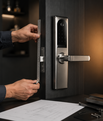
Door photos, drawings and old-lock details help SivoLock narrow the correct hardware direction.
Door thickness and frame width affect whether a model is realistic.
Lock body, backset and cutout need review before final model choice.
Left, right, inward and outward opening can change hardware planning.
Photos and drawings reduce guesswork for replacement and project doors.
Guide Finder
Find the right installation guide before choosing a model or lock body.
Start with the door evidence question, then open the guide that matches measurements, site photos, or replacement compatibility.
Visible guides: 3 / 3.
No matching guide in this category. Try thickness, backset, mortise, photos, frame, replacement or opening direction.
In-Depth Guides
Installation Guides for Real Buyer Decisions
Door measurements, photo evidence and replacement compatibility checks before model selection.
How to Measure Door Thickness, Backset and Mortise
Measure door thickness, backset, mortise, edge plate, frame and opening direction before selecting a replacement or project smart lock.
Smart Lock Door Photo Checklist
Use this door photo checklist to show the full entrance, both sides, door edge, mortise, frame, dimensions and outdoor exposure for smart lock review.
Replacement Smart Lock Compatibility Guide
Check whether a smart lock can replace an existing lock by reviewing door holes, mortise, backset, thickness, panel coverage, frame and handing.
Installation Decision Path
Door Details Buyers Should Capture Before Quotation
These rows are the practical evidence set for a better recommendation.
Show the full door and frame
A full view helps identify door type, frame width, hardware position and installation constraints.
Capture lock body and backset
Side-edge photos or drawings help review mortise and latch alignment.
Show the old lock and hole position
Replacement projects need current hardware evidence to avoid wrong cutout assumptions.
For aluminum doors, send profile drawings
Narrow frames and profile doors need more precise width and cutout review.
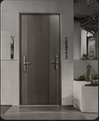
Outdoor gates, profile doors and replacement doors all need different evidence.
Installation Workbench
Use Photos and Measurements as the First Filter
Installation information should remove uncertainty before a buyer invests time in the wrong smart lock family.
- Door material and application scene
- Door thickness and frame width
- Mortise or existing lock body
- Backset, latch position and hole position
- Opening direction and handle direction
- Site photos: front, back, edge and frame
Installation Matrix
What to Send for Each Door Condition
The table helps buyers prepare the right evidence before asking for a recommendation.
| Door condition | Evidence needed | Why it matters | Related route |
|---|---|---|---|
| New wooden or steel door | Door thickness, opening direction and target lock body. | Confirms basic compatibility before function package. | /products/ |
| Replacement door | Old lock photos, hole position, backset and mortise. | Avoids mismatch with existing cutouts. | /support/installation/ |
| Aluminum profile door | Profile drawing, frame width, lock stile and cutout. | Narrow frames require precise fit review. | /products/categories/aluminum-profile-door-smart-locks/ |
| Outdoor gate | Gate photos, keeper alignment, exposure and shelter. | Outdoor and surface-mount conditions affect model direction. | /solutions/outdoor-gate-smart-locks/ |
| Project doors | Door schedule, drawings, quantity and installation timeline. | Repeated installation needs standardized hardware planning. | /solutions/project-door-smart-locks/ |
Installation Review Flow
From Door Photo to Model Direction
This flow keeps installation evidence in order.
Send full front and back door photos.
Capture thickness, frame and lock body area.
Show old lock, holes, mortise and keeper.
State indoor, outdoor, gate, hotel or project context.
Select model only after physical fit is checked.
Next Step Routes
From Guide Topic to Product Selection
Each guide helps buyers move from a practical question to the relevant product, material, support or inquiry path.
Buyer FAQ
Questions Before Quotation
These answers keep guide content practical and cautious while leaving model-specific details to final confirmation.
Can SivoLock recommend a lock from only a door photo?
A full door photo helps, but thickness, mortise, backset, opening direction and frame details are usually needed for a practical recommendation.
Why does backset matter?
Backset affects latch and lock body fit. It should be checked before selecting a model for replacement or project doors.
What if we do not have drawings?
Send clear photos of the door front, back, side edge, frame and existing lock. Drawings can be added later if available.
Are installation details the same for every model?
No. Installation details may vary by model, lock body, door structure and final configuration.
Ready to Confirm?
Send the door evidence before choosing the lock.
Share photos, measurements and installation conditions so SivoLock can narrow suitable stainless steel smart lock directions.
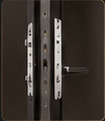
Door data, selected model direction and required documents make the response more useful.