Article contents 18 sections
A smart lock functional inspection takes sampled locks from the production lot and checks that each one does what the order specifies: opens for valid credentials, stays shut for invalid ones, locks and releases properly, works with its backup, and behaves as specified when power or the connection changes. The pass mark is what the bolt does. A beep, a green light or an app message saying "unlocked" tells you a command was accepted; the bolt has to be seen moving.
Each result in a useful report ties together four things: the unit tested, the conditions applied, the physical result observed and the requirement it was judged against. Below are ten test cases for importers, distributors and door manufacturers, followed by how to record failures, retest corrections and put the tested locks back into their delivery state. Lot selection, sampling, defect classes and the release decision are covered in the smart lock pre-shipment inspection checklist.
What Should a Smart Lock Functional Inspection Cover?
Test the functions on the order. A local keypad lock needs no cloud test; a lock sold with remote access needs more than a local unlock.
| Test group | What it answers | Keep as evidence |
|---|---|---|
| Configuration and setup | Right production configuration, correctly assembled? | Unit identity, software information, fixture and power |
| Valid and rejected access | Each ordered method opens the lock; invalid and revoked credentials leave it shut | Credential type, response and bolt position |
| Locking and inside operation | Locks and releases in the right sequence | Bolt, latch, handle and inside-control observations |
| Power and backup | Behaviour on low power, power loss and recovery | Conditions applied, warning, state, backup result |
| Connectivity and status | Local and remote paths, interruption and recovery | Connection path, command result, status shown |
| Delivery state | Test credentials and account bindings removed or transferred | Final configuration and its check |
These are function checks on the units tested. Service life, biometric accuracy across many users, resistance to forced entry and cybersecurity each need their own test programmes. For a pilot on real doors before the full order, see pilot installation planning.
Define the Expected Result Before Testing
"Check that the lock works" leaves the pass mark open to argument. Before the inspection, write down the approved hardware configuration, the software version or permitted range, the access methods, the operating modes and the delivery configuration. Take the expected behaviour from the purchase specification and the model's installation and operating instructions, and note the mechanical sequence: does a valid credential retract the bolt, engage a clutch so the handle can be turned, or release a separate locking device? The same user action has a different correct result on each.
The agreed procedure then states:
- which tests apply to each variant in the shipment, and how many units get each test;
- the number of cycles, their order and the starting state;
- any contractual response-time limit, and the events where timing starts and stops;
- the power source, fixture, network equipment and account permissions to use;
- the method and pass criteria for low-power and interruption tests;
- the configuration each lock must be in after inspection, including any customer provisioning.
No general rule sets a number of unlock cycles, a low-battery voltage or a cloud response time for shipment inspection, so an ordered function without an agreed criterion gets one before testing starts. An approved sample is a good reference for spotting differences, but it can carry older firmware, leftover credentials or an earlier configuration, so the written criteria take precedence.
Prepare a Test Setup That Represents the Ordered Assembly
Identify every tested unit
Give each sampled lock an inspection number linked to its production identity and the carton it came from, and record the lock body, handing, trim, hardware revision and software information where the lock shows them. Keep each unit's keys and accessories with that unit: keys mixed between test stations produce false backup failures and then ship in the wrong box. Where variants get different tests, the report keeps them apart, so a result from one handing, lock body or software version is read only for that variant.
Assemble the lock correctly
Use the specified spindle, cables, screws and mating hardware, set the fixture to the ordered door thickness, and follow the model's mounting and tightening instructions. Run the mechanism first with the fixture open, then closed against the strike; that separates an assembly fault from strike interference. A lock that runs freely on a loose bench assembly can bind once its screws are tightened, which is why the fixture matters.
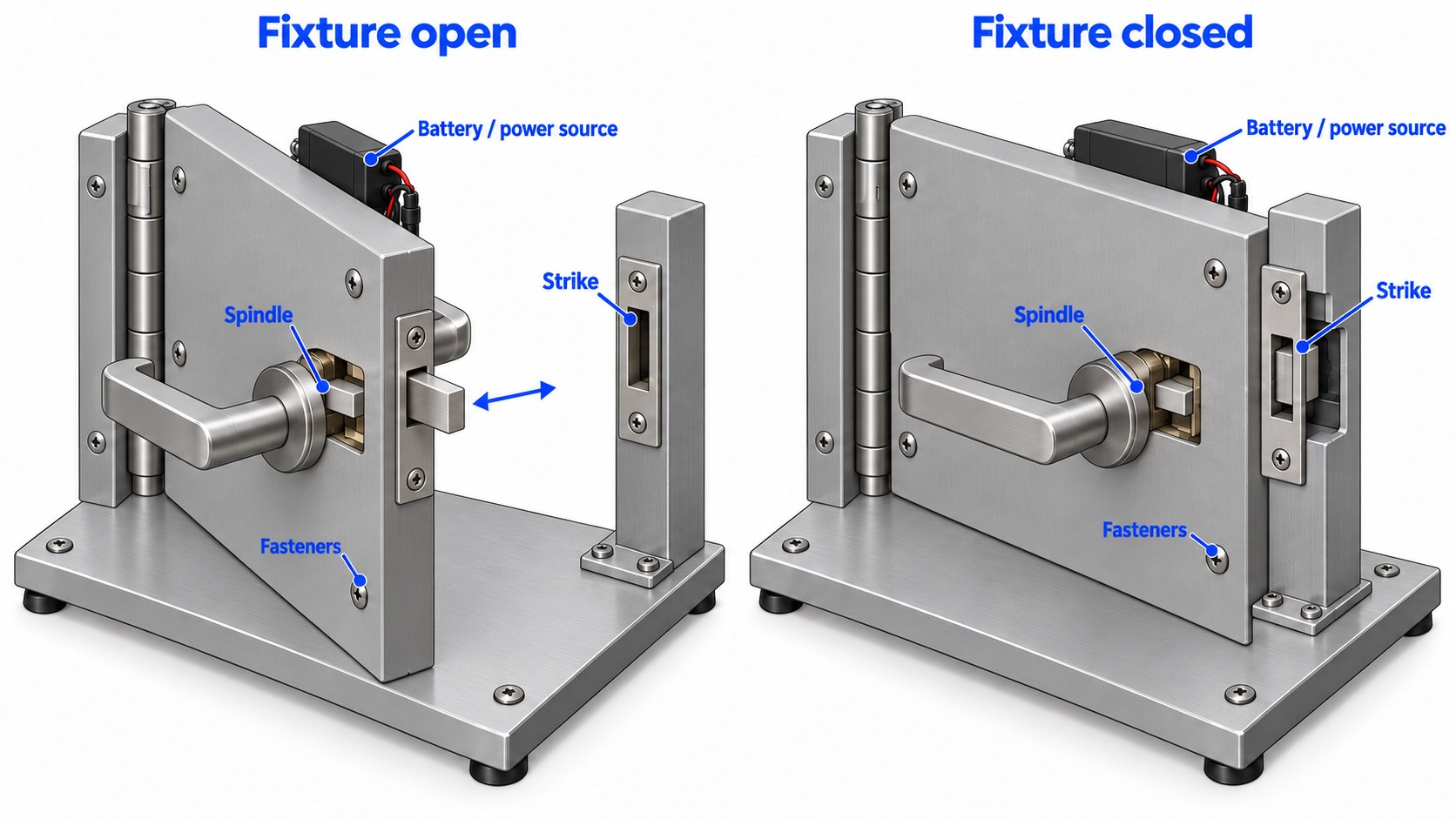
The Steel Door Institute lists door and frame alignment, hinge condition and incorrect strikes among the causes of tight latching in standard steel openings (SDI installation troubleshooting guide), so check the setup before suspecting the electronics. A fixture that needs adjusting is corrected, the correction noted, and the affected tests repeated; loosening screws, disconnecting a sensor or removing the strike to get a pass invalidates the result.
Control power, accounts and network conditions
Use the specified batteries, battery pack or regulated supply and record its settings. A battery that reads well with no load can still sag when the motor runs; on our locks a low battery can light the panel and still lack the power to move the motor. Set up dedicated inspection accounts and credentials, note the app version, gateway and connection route where they affect a test, and make sure a phone's mobile data cannot quietly bypass an interruption you are testing.
Set the fixture up so that a failed electronic release cannot trap anyone, keep hands clear of moving parts, and keep the approved recovery method within reach throughout.
Test Case 1: Initial Startup and Configuration
Test: With the unit correctly assembled and on its own power source, power it up in the normal installation sequence. Watch the startup indications and any handing or travel calibration, complete the authorised setup, and compare the operating mode, time settings and access methods with the order.
Pass: The lock reaches its documented operating state without restart loops, persistent errors or unfinished calibration; its identity and software information match the permitted configuration; setup leaves the mechanism in a known state.
Record: Starting state, power source, software information, calibration result and any error. A lock that arrives preconfigured for a customer is checked by the agreed method, without a reset.
Run startup first, because a wrong mode or incomplete calibration distorts every later result. If startup fails, save the failure record before troubleshooting or changing parts.
Test Case 2: Valid Credentials and Actual Unlocking
Test: With the lock secured in the fixture and a dedicated test credential enrolled, present the credential normally. Watch the reader response, the actuator and the final mechanical state, complete any required user action (such as turning the handle once the clutch engages), open the fixture, reset it and repeat as the plan sets out. Each ordered method gets its own entry: keypad, card, fingerprint, local app and remote access.
Pass: The credential produces the specified release sequence and the opening can be operated. Lights, voice prompts, motor sound and app acknowledgements are supporting observations; the release is the result.
Record: Method, credential ID (never the secret), repetitions, physical outcome and any measured delay. When timing, name the start event: first key touch, last digit, card presented and remote command sent give four different numbers.
For fingerprints, enrolment and routine use by the inspectors confirm the reader works. False acceptance and false rejection rates across many users and conditions need a biometric test of their own.
Test Case 3: Invalid, Deleted and Restricted Credentials
Test: Keep one working credential available. Try an unregistered credential of a supported type. Enrol a second test credential, check it works, delete or revoke it by the approved procedure, and try it again after the sync time the maker gives. If the order includes scheduled access, try a credential inside and outside its window after checking the clock and time zone. Test lockout after repeated wrong attempts only under an agreed procedure that includes the recovery.
Pass: Invalid and revoked credentials leave the mechanism locked; restricted credentials follow their rules; feedback and recovery match the documented design.
Record: Credential state, revocation method, sync condition, attempt and physical outcome. A deletion that had not reached the lock yet and a confirmed deletion followed by an unlock are different findings, so record which it was.
Keep working PINs, biometric records and account passwords out of a widely shared report: refer to test credential IDs and store sensitive evidence through the agreed controlled process.
Test Case 4: Locking, Relocking and Door-State Behavior
Test: With the ordered locking mode set and any door sensor fitted and calibrated per the instructions, unlock and open the fixture, close it normally and lock it by each locking method the lock has. For automatic relocking, watch the trigger and the delay; for handle-operated locks, make the handle movement before judging the result. Where the instructions define an open-door behaviour, test it separately, and keep an extended bolt from striking the fixture on closing. Simulate obstructions only by the approved method.
Pass: The lock reaches its secured state without abnormal binding, relocks as designed, and its warnings and status match the condition each is designed to detect.
Record: Door position, mode, trigger, observed bolt or latch position and indication. A door-closed signal reports the door; an actuator-position signal reports the motor; the bolt in the keeper is a third observation, so record each one you have.
Automatic locks need the closed condition reproduced well. Our R9 automatic profile-door lock, for example, locks when the door closes, and that depends on the door closing cleanly into the strike, so its fixture needs the strike set as it will be on the door. If a lock reports "locked" while the bolt visibly stays out, keep evidence of both observations and report it as a locking failure with a wrong status.
Test Case 5: Inside Operation and Mechanical Backup
Test: With the ordered inside controls and backup parts fitted and the unit's own key at hand, operate the inside handle, thumbturn or release, then any ordered privacy function and its override. Then use the mechanical backup in the locked state, with and without power where the instructions support both.
Pass: Each control gives its specified mechanical action, and the supplied backup parts work on their own unit without abnormal interference.
Record: Control, power state, privacy state, user action and resulting mechanism position, with inside operation and outside backup as separate results.
Every one of our 22 smart lock models has a mechanical key, and our J Series hotel locks also open with their key. A key opens a lock whose mechanism is sound; a jammed bolt, wrong spindle or binding strike defeats it too, which is one more reason to test on a correct fixture. Egress requirements for the inside release belong to the installed opening and get their own review on site; the shipment check covers the product operation that was agreed.
Test Case 6: Low-Power Warning and Emergency Power
Test: Use the lock maker's approved method for producing low power, with equipment that stays within the product's limits. Watch the warning and check the functions the specification says stay available. Where the lock has external emergency power, connect the supply named in the instructions to its port and try an authorised opening.
Pass: Warnings and restricted functions behave as the instructions describe, and emergency power gives the stated recovery function. Authorisation still applies on emergency power, and it charges an internal battery only where the specification says so.
Record: How low power was produced, readings, where the warning appeared, which functions stayed available and the emergency-power result. A warning on the lock and a warning in the app or through a gateway are recorded separately.
All our smart lock models have a 5 V Type-C port that powers the lock temporarily for an emergency opening; lithium packs are charged by the method the model's instructions give. Produce low power only with suitable equipment: mixed battery types, shorted cells and improvised chargers are dangerous, so if the right equipment is unavailable, report the test as not completed and say why. Remaining battery life, or the number of operations left after the warning, belongs to an endurance test, not to shipment inspection.
Test Case 7: Power Loss and Recovery
Test: Start from the unpowered behaviour that the approved specification gives for this locking assembly, and test from both the secured and released states where both matter. Remove the designated power source by the approved method, then check outside access, inside operation and the backup separately. Restore power and check startup, retained settings and normal access. Interrupt power during movement only under a procedure written for that.
Pass: Losing and restoring power gives the specified states, and permissions and configuration come back unchanged.
Record: Which source was removed, whether another supply or battery stayed live, the starting, unpowered and recovered states.
Unpowered behaviour is a property of the mechanism. SDC's electric-strike documentation, for example, distinguishes a keeper that stays locked when de-energised from one that unlocks (SDC electric-strike operating documentation); a battery motor lock has its own unpowered state, set out in its specification. Removing mains power while a backup supply keeps the lock running tests the supply changeover, and is recorded under that name.
Test Case 8: Local and Remote Connectivity
Test: With each ordered route working normally and test accounts holding the right permissions, test the local and remote connections separately, making sure remote commands really travel through the planned gateway or cloud route. Then interrupt one connection at a time, retest the functions that should keep working, and restore it.
| Condition | What it shows | Watch for |
|---|---|---|
| Local connection only | Which functions work locally | Operation without a hidden remote route |
| Internet down, local network up | Which functions need the internet | Local access, remote error message, how fresh the status is |
| Gateway off | Which functions run through the gateway | Credentials at the lock, affected app functions |
| Connection restored | How the lock resumes | Updated status, access and handling of waiting commands |
Pass: Each function follows its documented connection dependency, a failed remote command is reported as failed, and recovery works as described.
Record: The connection interrupted, app and gateway versions, command time, physical outcome and recovery, with one consistent time reference for comparing logs.
Watch interrupted commands closely: by design they expire, fail or retry, and a lock that acts unexpectedly when the connection returns is a finding. On our TTLock versions, for example, remote access runs through a TTLock gateway on the site's Wi-Fi, so the "gateway off" row is the one that shows what a site keeps during a gateway fault: fingerprints, PINs and cards already enrolled keep working within their validity.
Test Case 9: Status, Event Records and Warnings
Test: With the ordered sensors, logging and warnings enabled and their meanings known, produce normal lock and unlock events and compare the physical action with the lock's indication, the app status and the event record. Trigger other warnings only by approved, non-damaging methods, and where relevant repeat during a disconnection and after sync.
Pass: Indications and records match the events and states they describe, and historical or missing information is shown as such.
Record: Event type, displayed state, time, connection state and observed mechanism position. If the lock reports only command acceptance or motor position, the report says so and describes the result in those terms.
A warning that depends on the cloud is held up for as long as the outage lasts. The acceptance question is whether that matches the agreed design, including any local warning or later sync it requires.
Test Case 10: Restore the Intended Delivery State
Test: Once testing is complete and the evidence saved, remove temporary credentials, inspection permissions and test account bindings by the maker's procedures, restore the operating settings, remove test-network associations, and return the lock to the agreed uncommissioned or customer-provisioned state. Then check it: temporary access no longer works, and commissioning or the customer configuration still does. If that check needs another temporary enrolment, remove it and check again before packing.
Pass: The lock holds the intended delivery configuration and no inspection access.
Record: Restoration method, account-binding result, credential check and final configuration, plus how test data kept outside the lock is handled.
Local reset, cloud unbinding and account deletion are three actions unless the maker's process combines them. On our locks a factory reset deletes the administrator and every user, and app versions must then be added to an account again, so a customer-provisioned order is restored by removing the test entries, with no reset. NIST's IoT baseline lists authorised configuration changes, restoration to a secure configuration and protection of device data as device capabilities (NISTIR 8259A), which supports making clean-up part of the inspection; the reset sequence itself comes from the product's procedure.
Finally, return keys and accessories to their own unit, restore any battery isolation and protect the connectors before repacking, so a tested lock ships as ready as an untested one.
Record Failures So They Can Be Investigated
Write down what happened, and keep the suspected cause apart from it. "Motor defective" is a diagnosis; "valid credential accepted, motor audible, bolt stayed extended" is an observation. Each failure record carries the unit, test case, starting state, fixture, power and connection conditions, the exact sequence, the expected and actual result, the evidence, and for intermittent faults the attempt number.
| Result | Meaning | Follow-up |
|---|---|---|
| Pass | Test completed under valid conditions and met its criterion | Keep the result |
| Fail | Test completed and missed its criterion | Record the discrepancy and investigate |
| Not tested | Test not completed, or conditions invalid | State the reason and the coverage still owed |
| Not applicable | Function outside the approved configuration | Record the configuration reason |
A failure stays in the record after a later attempt succeeds. If a setup fault invalidated a test, record the evidence for that and list the results to repeat.
An intermittent unlocking failure. A sampled lock completes three cycles; on the fourth the reader accepts the credential and the motor runs, but the bolt only partly retracts; the fifth succeeds. The report shows four passes and one failure, with the sequence and conditions, so the inspector can look at mounting, interference, power and the mechanism with the full picture.
Incomplete connectivity coverage. Take an inspection of G1-1 locks on TTLock: 20 sampled units get local credential checks, and five of them also get the remote test through a TTLock gateway. The report states 20 units tested locally and five remotely; whether five meets the plan was settled when the plan was agreed.
Retest Corrections Without Losing the Original Result
A retest shows two things: the problem is fixed, and the fix has not broken anything nearby. After mechanical reassembly, repeat the affected operating sequence on the correct mounting. After a software or configuration change, repeat the access, power-recovery, connectivity and restoration checks that the change touches. Note any replaced part and the final configuration; a unit retested with a new part is evidence about the repaired unit.
For the shipment, the repaired samples speak for themselves, and the rest of the lot needs the factory's containment and correction records: which population was affected, what was done and to how many units. Further sampling or reinspection follows the agreed lot-acceptance process. At our factory a nonconforming lock is taken out of the release route, corrected and checked again; if the issue can affect a batch, we trace it through production and components, and our head of quality holds the batch until corrective action and reinspection are complete. Keep the original result, the corrective action and the retest linked, so later service investigations have the history.
What the Functional Inspection Report Should Include
The report names the shipment and the variants tested, the governing specification, the sample selection reference, the coverage and the results, with the test procedure attached or referenced and any authorised deviations listed. For each test group it gives the number of units tested and how many passed, failed or stayed untested, and it counts failing units separately from failed attempts.
It also lists open limitations, evidence for failed units, corrective actions, retest results and confirmation of the delivery state, and states whether the locks were tested on fixtures or on finished door assemblies; a bench result describes the bench setup. Quantity, labels, packaging, documents and compliance evidence are checked separately, and the authority to release the shipment comes from the buyer's release process.
Frequently Asked Questions
How many times should each smart lock be tested before shipment?
As many cycles as the inspection plan sets; no general rule fixes the number. A few cycles catch basic functional faults. Endurance and lifetime claims come from cycle testing on representative samples, which our factory runs on aging and cycle-test stations, separately from shipment inspection.
Does an app showing "unlocked" prove that the lock opened?
No. The message can describe the command or the motor position. The inspector watches the bolt, and records separately whether the door leaf was opened when that is part of the test.
Should a smart lock unlock when its batteries are removed?
It depends on the mechanism, and the approved product documentation gives the required unpowered state. Test outside access, inside operation and the backup separately; on our models the mechanical key and the 5 V Type-C port are the two backups.
Is a factory reset enough after testing?
Only for an order that ships uncommissioned, and the result still needs checking. On our locks a reset deletes the administrator and every user, and on app versions the lock then has to be added to an account again; check afterwards that the test account no longer controls it. Customer-provisioned orders are cleaned by removing the test entries instead.
Can a repaired sample change a failed shipment into a pass?
The repaired sample passes its retest; the shipment passes through the agreed containment, correction and reinspection process, with the original failure kept on record.
References
- Steel Door Institute — Installation Troubleshooting Guide for Standard Steel Doors & Frames. Guidance on mechanical alignment and latch/strike interference in standard steel openings.
- Security Door Controls — Electric-Strike Operating Documentation. Product-specific examples of fail-safe and fail-secure keeper operation.
- NISTIR 8259A — IoT Device Cybersecurity Capability Core Baseline. General capabilities for authorized configuration, secure restoration and data protection.