Article contents 13 sections
A hotel door lock system handles frequent guest turnover, busy arrival periods and coordinated work by reception, housekeeping and maintenance. An apartment smart lock system handles longer occupancy, individual household members, residents' visitors, and a clear line between building management and household control. On our range that usually means J Series hotel card locks, encoded at reception, for guest rooms, and the G-series apartment smart locks, managed in an app, for rental units.
The difference goes well beyond how long a credential lasts. It changes who can grant access, which doors a person can use, how changes reach those doors, and who responds when access fails. Short-term rentals and serviced apartments sit in between: a furnished apartment with nightly bookings and no reception desk needs hotel-style turnover alongside the remote support of a spread-out residential portfolio.
The starting point is the operating model: who changes access, how often it changes, and how quickly the property can resolve a problem at the door. The app, account and gateway side of that is covered in the smart lock app, gateway and access management guide.
Hotel vs Apartment Smart Locks at a Glance
| Operational requirement | Hotel | Long-term apartment | Short-term rental or serviced apartment |
|---|---|---|---|
| Main access lifecycle | Reservation, arrival, stay changes, departure | Move-in, household changes, visitors, move-out | Booking, remote arrival, stay changes, turnover |
| Routine administrator | Reception or a central operations team | Property manager, sometimes with delegated resident control | Host, property manager or remote operations team |
| Most important exceptions | Lost keys, room changes, late checkout, simultaneous arrivals | One resident leaving, replacement credentials, visitor changes | Failed credential delivery, early arrival, unreachable host |
| Staff access | Separate housekeeping, maintenance and management permissions | Scheduled maintenance and building services | Cleaning and maintenance between bookings |
| Shared access | Lobby, assigned floors, guest facilities | Building entrance, parking, common rooms, amenities | Building route plus booking-specific access |
| Support advantage to design around | An on-site team, where there is one | Continuing relationships with residents | Remote coordination and local responders |
| Procurement priority | Fast, repeatable workflows in busy shifts | Individual permissions and controlled delegation | Reliable arrival preparation and practical recovery |
A large apartment building can need more complex permission management than a small hotel, and a small remote rental can need tougher recovery arrangements than either. Door count alone does not decide which system fits.
Hotel Access Follows the Stay; Apartment Access Follows the Household
Hotels: manage frequent changes without creating a front-desk bottleneck
A hotel credential belongs to a stay, a room assignment and a validity period. Reception has to be able to issue, replace, extend or reassign it without disrupting the guest's arrival or stay. Creating one credential in a demonstration says little about several guests arriving at once. Time the whole task: finding the reservation and room, preparing each guest's credential, explaining it, and handling a failed delivery or encoding attempt.
Salto Space, for example, has a group check-in workflow that prepares keys before arrival. Its mobile check-in documentation also describes guest app registration and an internet connection for receiving key data; both need a place in arrival planning. Salto Space: Check-in
Mobile access works in hotels once the property has decided what happens when a guest arrives without finishing setup, has an incompatible phone or cannot open the invitation. A staffed property handles it at reception; an unattended one needs a fallback arranged in advance.
On our J1, J2 and J3 locks the guest credential is an RFID card encoded at reception, with a mechanical key as backup, and an order can include a compatible encoder, guest and staff cards, extra readers and room power switches. A hotel that keeps its existing card system sends its name and a photo of a guest card, and we check compatibility before quoting; connecting to a property management system needs its own technical review (hotel smart lock systems).
Apartments: manage people independently within an occupied unit
An apartment's occupancy can stay the same while its authorized users change: one household member leaves, another joins, a regular visitor no longer needs access. So the link between a person, a credential and a unit matters. If everyone shares one PIN, removing one person means replacing the PIN and giving the new one to everyone who stays. With individual credentials, the operator removes only the departing person's.
Resident self-service needs its own limits: a resident who can invite visitors should not be able to change building-wide settings or reach other apartments.
Salto Homelok draws this line through property-level and unit-level management. Its unit documentation describes both delegated unit management and managed apartments where the property manager keeps administering access, and limits unit access schedules to the same or a narrower scope than the property manager allows. Salto Homelok: Creating and Moving In Units
On our G-series, each credential is enrolled or issued individually by the manager: fingerprints, PINs, cards or shared app access at move-in, temporary codes for visitors and contractors, and separate codes or cards for maintenance staff. Capacity differs by version: G1-1 on TTLock holds 100 fingerprints, 250 PINs and 1,000 cards, while G1-2 on Tuya Wi-Fi holds up to 50 fingerprints, 110 PINs and 110 cards, so count the people each door has to hold before choosing the version.
Plan the Entire Access Route
A working room or unit lock is one part of a successful arrival. A guest or resident may also pass a vehicle gate, a building entrance, an elevator reader and a corridor door.
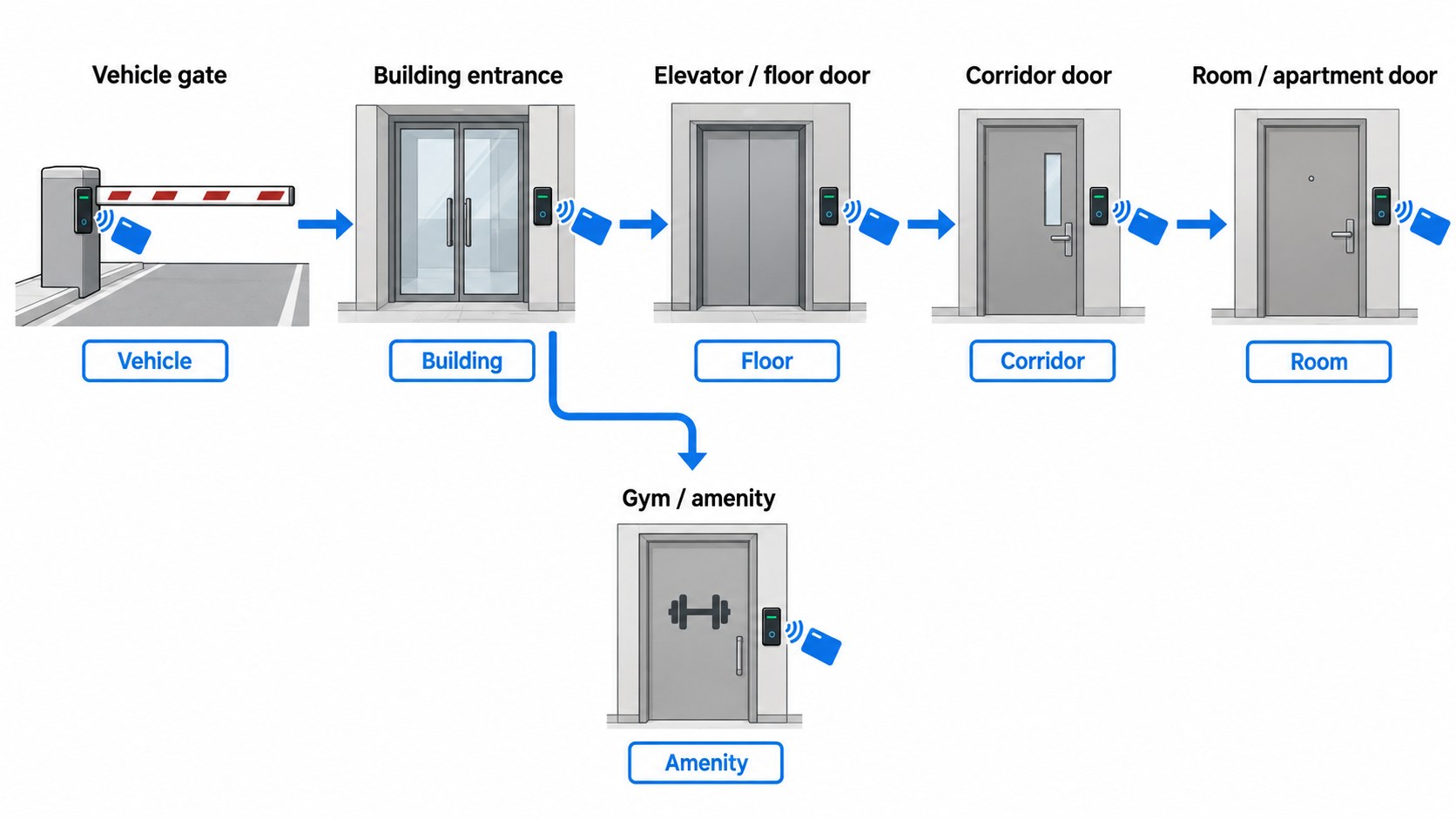
Map those points before choosing credentials. In some systems one credential works across several of them; other projects run separate systems. Either way, the permissions have to agree from point to point and the instructions have to be clear. On a hotel site with garden gates or service entrances, plan those exterior doors as a group of their own, with outdoor hardware: an IP66 model such as L1 for a metal gate or A2 for a door with a mortise.
| Access point | Hotel decision | Apartment decision | Acceptance check |
|---|---|---|---|
| Main entrance | Does access start before the room is ready? | Which residents and visitors may enter? | Test the route outside staffed hours |
| Elevator or floor entrance | Does a room change need a floor permission change? | Are residents limited to assigned areas? | Test permitted and excluded destinations |
| Room or unit door | Which guests belong to this stay? | Which individuals belong to this household? | Remove one permission without disturbing unrelated users |
| Gym, pool or other amenity | Included in the booking or bought separately? | Which building rules and schedules apply? | Check access outside the allowed schedule |
| Service areas | Which staff roles need entry? | Which contractors need access for which task? | Guest and resident credentials stay out |
Salto Space, for example, documents guest access levels for areas such as floors and leisure facilities, with optional facilities chosen at check-in, so a room assignment and an amenity entitlement are set separately. Salto Space: Guest Access Levels
A late checkout should not shift the schedule of amenities booked on their own, and a departing guest should still be able to collect luggage from a shared store after the room credential has ended. The property sets these policies first, then checks that the proposed system can carry them out.
Four Scenarios That Reveal Operational Fit
Each scenario is an acceptance test: it states the outcome a proposed system has to deliver.
Scenario 1: A hotel guest moves from Room 306 to Room 508
The guest has a room credential and access to the main entrance and the third floor. Reception approves a move to the fifth floor because the original room needs maintenance. The job is more than a second room credential:
- Confirm the guest's identity and the approved room change.
- Prepare access to Room 508 and the route to it.
- Decide whether a short overlap is needed to collect belongings from Room 306, and who ends it.
- End access to Room 306 by the supported procedure, and check the result at the door.
- Remove the third-floor permission if it is no longer needed, keeping the entrance and other valid entitlements.
- Mark Room 306 for maintenance and housekeeping before it is released for another stay.
The test covers every credential issued for the stay, including a companion's card or mobile key; updating only the lead guest's credential can leave the move half done. Card systems differ here, which is why the trial-room test for a room change on our J Series is “the new card opens the new room; check what the old card does”.
A successful demonstration shows the operator completing the move, explaining which old credentials still work during the transition, and showing that access ends where intended, while the guest keeps what they need for the rest of the stay.
Scenario 2: One apartment resident leaves while another remains
Two residents share an apartment, and an authorized household change removes one of them. The operator identifies the departing person's credentials, the visitor permissions they manage and any administrative role they hold. Resetting the whole unit locks out the resident who stays; disabling one mobile key leaves the departing resident with any card they hold or shared PIN they know.
The procedure has four parts: remove the person's access, replace shared credentials where needed, review their invitations, and transfer any household management role. The remaining resident keeps the apartment and their common areas.
A successful demonstration shows an individual removed without resetting the occupied unit, with every credential type accounted for. It is run with an authorized test account, never with a real resident's access.
Scenario 3: A household moves out and the unit becomes vacant
A whole household leaves at the end of its tenancy. The next occupant has not moved in, and cleaning, inspection and repairs happen while the unit is empty.
Turnover means ending everything tied to that household: resident credentials, visitor invitations, delegated management or admin rights, and recurring permissions. That applies at the apartment door and at every shared door that came with the tenancy, such as the building entrance, elevator, parking, storage and amenities. On our G-series that is the step that matters most: the manager removes all of the tenant's fingerprints, PINs, cards and app access, and checks at the lock itself that none of them opens the door. With the G2 video version, the outgoing resident's visitor permissions are removed too, and the account and call recipient set up for the next one (apartment and rental smart locks).
Where individual removal cannot end the household's access, shared PINs and other electronic credentials are replaced and the old ones checked for rejection. Mechanical keys are returned, and rekeyed where required, under the property's procedure, because deleting credentials in the app does nothing to a mechanical key. The same check covers visitor credentials the household created that would outlast the move-out, and any role that could still grant new access.
A vacant unit still needs some access. Cleaning, inspection, maintenance and leasing staff get separate, time-limited permissions for their work, from staff or contractor roles instead of the former resident's account, reviewed when the task ends. Before release, check the result at the doors and review the records for open or scheduled permissions. The next household's access then comes from the new occupancy record, with only its own unit and shared-area permissions and nothing inherited from before.
A successful demonstration shows the whole household cycle closed, controlled staff access during the vacancy, and a unit ready for new occupants with no carried-over permissions.
Scenario 4: A short-term rental guest arrives after the host has gone offline
The guest has arrival instructions, but the apartment sits behind a separately controlled building entrance. The apartment credential works; the entrance credential was never delivered. The guest is locked out of the property, and resending the apartment code does not help.
Before arrival, the operator checks that the guest has credentials and instructions for the whole route. Where mobile onboarding is required, the workflow flags unfinished setup while support is still available. The recovery plan names who answers after hours, how they verify the guest, and who can go to the site when remote action is not enough.
A successful demonstration shows the support team telling a missing credential from an unavailable device or a wrong assignment, then using an approved recovery method. Time it until the test guest is inside, including any travel by a local responder.
Checkout, Credential Expiration, and Room Readiness Are Different Events
A property-management record, a lock's access decision and a housekeeping status change at different times, and treating them as one event creates gaps.
Checkout records a departure. Expiration ends a credential's scheduled validity. Cancellation ends access before that time through the system's supported mechanism. Room readiness confirms the room or unit is available to the next occupant.
Salto Space, for example, states that checking out a guest updates the check-in list without invalidating the key; the key stays valid until it expires, or until the next guest uses their new check-in key at the room. So check what the old key does at the door; the checkout screen will not tell you. Salto Space: Check-out
For any proposed system, test three cases: a scheduled departure, an early departure and a late extension. In each, check the door itself; an extended booking helps only if the guest's credential keeps working at the doors that matter. Have each update shown with the door connected and disconnected. If an early cancellation needs a local visit, a presented credential or restored connectivity, that step and its delay go into the operating procedure.
Even when the credentials are right, the room may not be ready: cleaning, inspection, repairs or the next assignment can still be pending. The handoff names who releases the room for sale or occupancy and what reception is told.
Staff and Contractor Permissions Need Their Own Lifecycle
Staff access runs on its own schedule, not the guests'. Housekeeping needs access after departure, maintenance before a room is released, and a contractor a tightly limited appointment window. Start from the work assignment: each role gets the areas it needs for the time it needs them, with a defined route for exceptions.
| Role | Operational scope | Change that triggers review |
|---|---|---|
| Reception or leasing staff | Issue and amend access within assigned properties and duties | Shift responsibility, site reassignment, employment change |
| Housekeeping | Assigned rooms and service routes | Roster change, finished assignment, leaving the team |
| Maintenance | Doors needed for authorized work | Work finished, rescheduled, contractor replaced |
| Resident with delegated control | Approved household users and visitor permissions | Household change or transfer of unit management |
| Installer or service provider | Commissioning or approved support tasks | Project acceptance or end of the support session |
A shared staff credential makes it hard to tie an event to a person. Where individual accountability matters, require named credentials and test what the event record actually identifies; an unlock event shows which credential was used, not whether the door was physically opened.
Unlocking a door and administering the system are different permissions. A cleaner needs no account ownership to clean, and a maintenance contractor should not keep administrative access after the repair. On our apartment locks, the property team decides who owns the admin account, so control stays with the property when staff change.
Hotel systems can add their own functions. Salto Space, for example, documents room-cleaner keys that create a room-cleaned audit entry visible to reception; in that documented function the room-cleaner key does not unlock the door. The same guide describes separate procedures for copying keys and handling lost guest keys. If the property needs functions like these, test each one; having staff cards does not mean a system offers them. Salto Space: Configuring Hotel Keys
Integration Should Follow the Property's Decisions
A hotel property management system, a rental booking system and a residential management system can each hold information that access operations need. The question is which approved business event changes each permission: for hotels, reservation changes, room assignment, check-in, extensions, room moves and departure; for apartments, move-in, individual household changes, visitors and move-out; for short-term rentals, booking changes and cancellations before arrival too.
The integration brief states:
- the system that owns the approved occupancy dates and room or unit assignment;
- the event that authorizes creating or changing a credential;
- the doors and credential types each event affects;
- the confirmation operators get when a change succeeds or fails;
- the procedure for manual corrections and later reconciliation.
A good demonstration interrupts one update on purpose. Approve an extension while the link between the business system and the access platform is down; the operator should see the open change, arrange an approved temporary solution, and confirm the final access state once service returns. Without that visibility, automation spreads an error and hides its source. A smaller property can reasonably run a manual workflow if it is written down, manageable at its volume and checked consistently. For our apartment locks, connecting to existing property software is reviewed per project: send the software name and the operations you need.
Match Connectivity and Recovery to Staffing
An on-site team lowers the cost of an exception: a receptionist replaces a credential on the spot, where a remote operator may have to send someone across town for the same problem. So response arrangements belong in system selection.
The tasks that need communication with the lock (changing an existing permission, receiving an event record, checking status, requesting a remote action) can each use a different path, so test local unlocking, remote administration and new credential delivery one at a time. On our G-series the three platforms show the range: TTLock versions (G1-1, G2 Standard, G3-1, G11-1) connect by Bluetooth at the door and need a TTLock gateway and Wi-Fi for remote access; Tuya Wi-Fi versions (G1-2, G3-2) connect over the building's Wi-Fi; the Tuya Bluetooth version (G11-2) also connects by Bluetooth, and we confirm its remote functions with the order. On all of them, credentials already enrolled keep working within their validity when the network is down, and remote changes wait for the connection, so an early cancellation sent to a disconnected door has to be planned for.
For each property, document a recovery sequence: who receives the report, who verifies the requester, which alternatives exist, and who can go to the door if they fail. Include loss of an administrator's phone and of account access as well as guest lockouts. At handover, the operating organization holds the agreed ownership account and recovery contacts, staff use their assigned roles, and the installer shows that routine operation continues once temporary commissioning access is removed.
Compare Operating Cost, Not Just Lock Price
A lower purchase price can be eaten up by repeated credential support, travel or admin work, and an elaborate system costs money when its workflows exceed what the property needs. Compare proposals covering the same equipment and services over the same period: locks and door preparation, readers for shared access, communication equipment such as gateways, software subscriptions, integration, replacement credentials and batteries, training, maintenance and support.
Then estimate the cost of exceptions from the property's own experience:
Annual access-support labor cost = annual support incidents × average handling time in hours × loaded hourly labor cost.
For example, 20 incidents a month at 15 minutes each take 60 hours of handling a year. The loaded hourly rate includes wages and employment costs; site visits add travel and callout costs, and incidents that pull staff off other work add more.
Hotel buyers measure credential preparation and exception handling at busy arrival times; apartment buyers measure household changes and visitor admin; remote rental operators watch how often someone has to go to the door, and what that costs.
Run a Pilot Around Real Changes
A pilot ends with evidence that the operating team can do its recurring tasks, on the proposed hardware, software, credential types, account roles and shared doors. For hotels that is a trial room run with the actual encoder and cards; for apartments, a pilot floor or block of units run through the whole tenant cycle by the people who will manage the building, after one sample per door group has been fitted on the real doors. In 2024 a Malaysian apartment systems supplier ordered 1,800 standard smart locks from us after installing two samples on site, and two further orders added 750 sets that year.
| Pilot task | Evidence to record |
|---|---|
| Arrival or move-in | Time to prepare usable access at every required door; help the user needed |
| Lost credential | Result for the lost credential, its replacement and other valid credentials |
| Room move or household change | Permissions removed, permissions kept, effect on other occupants |
| Full household move-out and vacant-unit turnover | Former household and visitor rights end at the unit and shared areas; delegated control removed; staff access kept; the new household inherits nothing |
| Early end or extension | Door behavior before and after the change, including with the door disconnected |
| Staff or contractor change | Correct scope, and the former permission removed |
| Connectivity interruption | What keeps working, what waits, and the recovery procedure |
| Management handover | The new administrator operating after former access is removed |
Pass criteria are set before the demonstration, from the property's staffing, arrival volume and response commitments; acceptable task times and cancellation delays differ from building to building. Record both what the operator did and what happened at the door: a screen showing a submitted request shows only that the request was sent; confirm the access state with a controlled test at the door.
Frequently Asked Questions
Can a hotel smart lock system be used in an apartment building?
Yes, when it supports the building's household, visitor, shared-door and management workflows. A room-based card system needs close scrutiny where residents change independently or manage their own visitors, so test those tasks before treating hotel suitability as residential suitability. On our range, apartments normally use the app-managed G-series, and guest rooms the J Series card locks.
Do apartment residents need to own the lock account?
No. Building management can keep ownership of the account while residents get limited permissions for their own household. The agreement and configuration state who manages visitors, shared-area access and recovery.
Does every hotel door lock or apartment lock need a permanent internet connection?
No. On our locks, fingerprints, PINs and cards already enrolled keep working within their validity when the network is down; remote changes and monitoring need the connection. Test local use and remote functions separately under the intended connection, and let staffing and acceptable response time decide which limits the property can live with.
Should short-term rentals use hotel or apartment access workflows?
A mix: the booking and turnover workflow of a hotel, with support arrangements that suit the site. An unattended rental needs the whole arrival route covered, clear credential delivery, a reachable responder and a local recovery option for when remote help is not enough.
Choose the System Your Team Can Operate
The right system makes routine changes repeatable and exceptions manageable for the team that will actually run it. That shows when a guest changes rooms, one household member leaves, a contractor finishes, or an arrival fails outside staffed hours, which is why the trial room or pilot floor runs exactly those events before the order covers the building.